
1
Send to the shared area
When one item or a multi-selection is active, the shared-area button can copy the selected part from the workspace, group, true/false action branch, dialog, and variables surfaces into the device-local library.
No-Code Workspace — Block Reference
Runs actions for app, network, device and custom condition events
Documented for app version 1.0.60 (not on Google Play yet)Updated:
Block Preview
Captured from the in-app Visual Builder block card in the English UI.
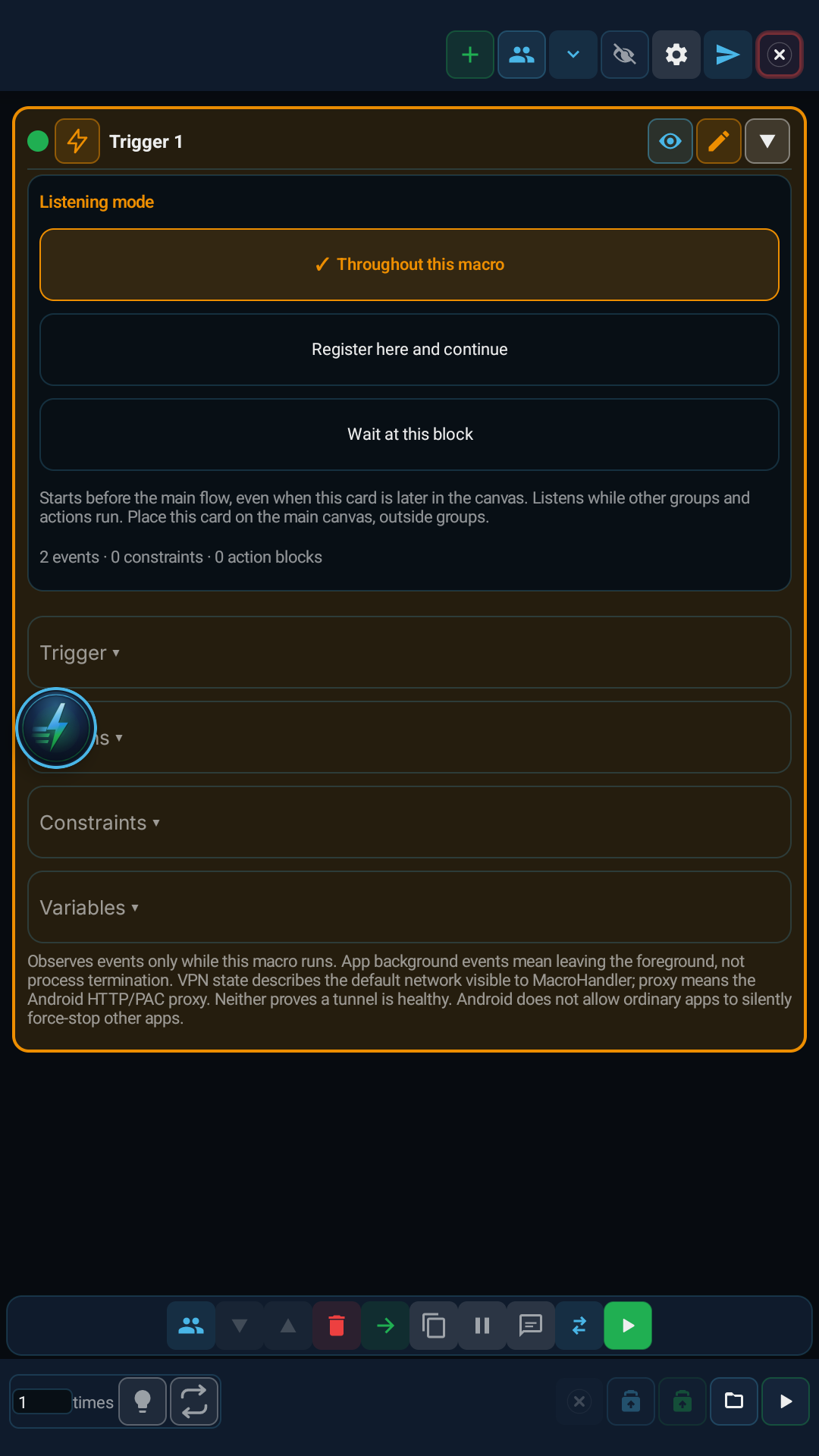
Builds event-driven flows with Trigger, Actions, Constraints and Variables sections. Choose observation throughout the macro, observation starting at this card without waiting, or waiting at this block. There are 36 event types including foreground app transitions, network/VPN/proxy changes, screen, charging, battery, notifications and periodic timers. Multiple events use OR; state and event constraints use nested All/Any/None groups. Checks reuse existing blocks and return true to accept or false to reject. Actions run serially.
When a device, network or app event should run a sequence of existing blocks.
Select events, add optional checks and constraints, connect the Actions branch, then configure timeout, repetition and the event variable.
One or more events with optional package and notification-text filters. A custom condition fires on false-to-true transitions; accepting an initially true state is an explicit option.
Wait timeout, check interval, cooldown, maximum event age and action count; numeric fields support variable bindings. Zero timeout/count means until stopped.
Network, VPN, proxy, screen, lock, charging, battery, orientation and foreground app. Unknown values cannot pass negated constraints. The event result is a map variable.
| Parameter | Description |
|---|---|
| Events and filters | One or more events with optional package and notification-text filters. A custom condition fires on false-to-true transitions; accepting an initially true state is an explicit option. |
| Timing and repetition | Wait timeout, check interval, cooldown, maximum event age and action count; numeric fields support variable bindings. Zero timeout/count means until stopped. |
| Constraints and variables | Network, VPN, proxy, screen, lock, charging, battery, orientation and foreground app. Unknown values cannot pass negated constraints. The event result is a map variable. |
Select Default VPN lost and Internet validation lost. Add System → Send selected foreground app to background and System → Post system notification. The package filter applies to app/notification events; choose the target app in the action for network events.
Build custom checks with Image/Text/Compare/Group blocks and Return a boolean result. Use Map to read type, packageName and state from the event variable. Use Trigger.watch/pause/status/join/atomic for non-blocking observation and Trigger.open/next/state/close/run for blocking use.
Runs actions for app, network, device and custom condition events
Observes only while the macro runs. VPN means default-network visibility; proxy means Android HTTP/PAC configuration, not tunnel health. Backgrounding an app does not force-stop it. Lost accessibility/notification access and queue overflow raise errors. Timeout clears the old event; stop releases observers.
The same block at three levels: a quick start, the real options, and professional techniques.
Choose when to observe events: before the main flow starts, when this card is reached without blocking the flow, or by waiting at this block. Only a card on the main canvas can observe from the start of the macro. Actions run in order after an event is accepted. The editor has Events, Actions, Constraints and Variables. In Logic, Checks are an inner scope; Actions and Timeout are canvas connections.
Multiple events use OR. Device-state and event-data constraints support nested All, Any and None groups: 4 levels and 64 total conditions/groups. Time ranges can cross midnight; weekday, battery temperature, network transport and notification fields are available. Text comparisons are case-sensitive. For complex rules, put existing blocks in Checks and Return true/false. A custom condition triggers on a false-to-true transition; an initially true condition fires only when explicitly enabled.
In code, Trigger.watch registers without blocking; Trigger.pause/status/close controls the observer and Trigger.join waits for completion. Trigger.atomic defers trigger actions within a critical section. Trigger.open/next/close remains available for blocking use. Trigger.run manages serial actions and cleanup. Each macro allows 8 observers and each observer holds 128 pending events; overflow raises an error instead of silently dropping data. Stop releases observers. Constraints use current state read before the action; unknown state cannot pass a negated condition.
Small, reproducible examples that combine several blocks — build them straight into your own macro.
This block is useful on its own — but it shines when paired with the right partners.
Checks compose existing scans and logic; an explicit boolean return accepts or rejects the event.
Actions execute existing blocks serially. Launch another app with the existing System command.
Read and branch on event type, package and state. Timeout replaces the previous event with a timeout result.
This block does not start a stopped macro. Observation starts according to its selected mode and ends when stopped. Enable keep listening to outlive the main flow. Count 1 ends after the first action; use 0 for continuous listening.
VPN visibility does not guarantee tunnel health. Proxy covers Android HTTP/PAC configuration, not private SOCKS settings. Backgrounding is not force-stop.
Checks are predicates: a check that does not return true is rejected. Long checks may exceed the maximum event age.
Each row starts with the message the app shows or the block’s output, followed by what to do.
App events require connected accessibility and notification events require connected notification access. Lost access raises an error; the macro cannot grant itself these permissions.
In either non-blocking observation mode, Return/Break ends only the observer and Continue skips the rest of that event. In blocking mode Return exits the macro. Observer actions run serially at safe checkpoints; blocking operations can delay them. Held input finishes first. An unhandled observer callback error ends the run.
The Lua below is what the Code Editor generates for this block with sample settings. Adding cases, branches, actions or loops, or changing settings, extends the generated code accordingly. Study it to see what the block does under the hood, to learn Lua, or to copy and adapt it. Use the Copy button (top-right) to paste it into the Code Editor, or “Try in Editor →” to run it in the live editor.
local __mh_trigger_api = Trigger
local trigger_event = nil

do
 trigger_event = nil
 local _mh_trigger_result_1 = __mh_trigger_api.run({events={"app_foreground"},packageName="",textContains="",timeoutMs=60000,intervalMs=250,cooldownMs=1000,maxEventAgeMs=30000,maxEvents=1,fireInitially=false,priority=0,constraintMode="all",constraints={},constraintGroups={}}, {
  action = function(_mh_trigger_event_1)
   trigger_event = _mh_trigger_event_1
   local _mh_trigger_signal_1, _mh_trigger_value_1 = (function()
    System.log("event")
   end)()
   if _mh_trigger_signal_1 == "__VB_RETURN__" then return false, {signal=_mh_trigger_signal_1, value=_mh_trigger_value_1} end
   if _mh_trigger_signal_1 == "__VB_BREAK__" then return false end
  end,
 })
 if _mh_trigger_result_1.value and _mh_trigger_result_1.value.signal == "__VB_RETURN__" then
  do return _mh_trigger_result_1.value.value end
 end
 if not _mh_trigger_result_1.ok then
  trigger_event = {type=_mh_trigger_result_1.reason, count=_mh_trigger_result_1.count, elapsedMs=_mh_trigger_result_1.elapsedMs}
 end
end
Note: generated code can evolve across versions; helper names (e.g. _reg1, m1) and internal optimizations may change. The logic and the called APIs reflect the block’s behavior.
The guidance below is not identical for every block. It summarizes the professional controls that most often repeat in the selected block family.
Define TRUE/FALSE, try/catch, and loop exit behavior before chaining more blocks.
Keep it explicit where group, dialog, and loop variables are created and where they are consumed.
Long flows become brittle quickly without timeouts, ASSERT blocks, BREAK logic, or explicit guards.
Moving repeated steps into GROUP and GROUP_CALL improves readability in larger projects.
TOUCH and TOUCH_BREAK cover recipe-style touch flows. Raw pointer choreography such as Touch.down, Touch.move, Touch.up, Touch.dispatch, Touch.reset, Touch.breakAll, and Touch.releaseAfter is not exposed as a first-class builder block.
Touch.downTouch.moveTouch.upTouch.dispatchTouch.resetTouch.breakAllTouch.releaseAfterThe DIALOG block and dialog designer cover a bounded field set in the builder: Info Text, Text Input, Checkbox, Description, Radio Group, Dropdown, Multi Select, Tab Group, Date Time, Number Range, Slider, Image Picker, Color Picker, File Picker, Recorder Picker, Tag, Signature, and Spacer. The buttons are designed too: the Positive button and Negative button tabs set each button’s text, background, and border color, corner radius, and minimum height next to a preview. Freer Setting.builder composition, multi-step wizard flows, and mixed HUD/dialog choreography still do not map 1:1 into the builder.
v1.0.51+Two more fields: Agent Detect references (agent_detect_editor) lets the user pick a saved reference set or add and edit references, and Save confirms the selection; Navigation setup editor (navigation_editor) edits a saved map, marker and route from the Dialog and returns the setup and route selection without moving the character.
Setting.builderDialogHudTextViewAgentDetectEditorNavigationEditorHTTP_GET, HTTP_POST, and HTTP_PUT cover common fixed-method flows; HTTP_REQUEST covers one bounded request with method, header lines, body, content type, query parameters (GET and DELETE), timeout, and a bounded retry. These blocks never throw; they write the status code (-1 on a network failure). Cookie handling, chained request objects, and lower-level client flows still need the code editor.
Request()Request.setCookieRequest.getCookiesCUSTOM_CODEThe MAP, LIST, JSON_PARSE, REGEX_MATCH, and METRICS blocks cover the everyday cases: map actions, a static list, reading a value from a JSON path, regex match, find, replace, and split, and metrics actions. The rest of the Map, Array, JSON, Regex, and Metrics APIs (for example Array sort, filter, and map) is broader than the builder recipe model and stays on the CUSTOM_CODE and code editor side.
MapArrayJSONRegexMetricsRuntime helpers, raw Request objects, Lua built-ins such as print/pcall/xpcall, and free-form object chaining patterns are represented through CUSTOM_CODE or the code editor.
RuntimeRequestprintpcallxpcallCUSTOM_CODEEach block card now exposes an independent breakpoint toggle. When enabled, the breakpoint preference is stored with the block.
Breakpoints are only emitted into runtime code when Debug Mode is enabled from Visual Builder settings. When Debug Mode is off, breakpoints stay saved but do not pause execution.
Use ASSERT for fail-fast validation, and use breakpoints for step-by-step tracing and controlled pauses in the same flow.
Variables defined with SET_VARIABLE are accessible throughout the macro (global scope). All blocks can read/write the same variable.
However, a variable defined inside a GROUP will be 'nil' (undefined) until the GROUP executes. Blocks outside the GROUP using this variable may produce unexpected results.
FOR_EACH loop variables (item and index) only carry valid values inside the loop body. Outside the loop they are outside local scope and should not be used.
TRY_CATCH error variable is only valid within the catch block. If the try block succeeds, the catch branch is not entered and the error variable remains undefined.
TIP: Before using a variable inside a GROUP, assign a default value with SET_VARIABLE outside the GROUP. This way the variable won't be nil even if the GROUP has not run.
You can embed variable values and calculations into text fields using {{ expression }} syntax. Expressions inside double curly braces are evaluated as Lua code and the result is inserted into the text.
{{ expression }}Skor: {{ score + 1 }} → "Skor: " .. tostring(score + 1){{ name }} kazandı! → tostring(name) .. " kazandı!"X:{{ x }} Y:{{ y }} → "X:" .. tostring(x) .. " Y:" .. tostring(y)Expressions are checked by the sandbox policy. Security-sensitive calls like loadstring, require, debug are automatically blocked.
Keep scan regions as small as possible — improves speed, reduces false matches.
Always add an exit condition when using infinite loops (BREAK, timeout, or conditional exit).
Use network operations and error-prone steps inside TRY_CATCH.
If you need global error handling, use the Error Handler (ERROR_HANDLER) block as a singleton in the project.
Small coordinate offsets (CLICK/SWIPE) improve tap accuracy across different DPI and screen scales.
Customize macros with Dialog block — different parameters each run.
Define repeating steps once with GROUP_CALL, call from many places.
Cross-macro local library
The Local Shared Macro Area moves blocks, variables, dialog fields, gallery assets, and imported media dependencies between macros on the same device. It is device-local, not cloud sync, not Firebase sharing, and not a replacement for public macro sharing.
Professional usage model: put a reusable login flow, common scan region, shared dialog form, variable group, template image, color profile, replay recording, or imported PLAY_SOUND media file into the shared area from one macro, then import it from the relevant + menu in another macro.
VISUAL_BLOCKSVARIABLESDIALOG_FIELDSTEMPLATE_IMAGECOLOR_SWATCHREPLAY_RECORDMEDIA_FILEWhen one item or a multi-selection is active, the shared-area button can copy the selected part from the workspace, group, true/false action branch, dialog, and variables surfaces into the device-local library.
The shared-area entry under the + menu imports the selected item into the surface that opened it. Main workspace, group, action branch, dialog, and variables each receive the compatible item type.
Gallery items include template images, color swatches, replay records, and imported audio/media files. They can move between macros on the same device so repeated templates, colors, recordings, and PLAY_SOUND media assets do not need to be captured again.
The shared area is not a permanent dumping ground. Delete stale shared items from the shared-library panel; imports create a copy in the target macro and do not rewrite the source macro flow.
AI assistant
Tell MH AI what you want in plain language; it proposes the right block sequence and lands it in the workspace after you approve. In the current release it works with cloud providers such as Gemini, Claude, and OpenAI; on-device local models are on the roadmap.