
1
Send to the shared area
When one item or a multi-selection is active, the shared-area button can copy the selected part from the workspace, group, true/false action branch, dialog, and variables surfaces into the device-local library.
No-Code Workspace — Block Reference
Finds and tracks targets that resemble the examples you marked
Documented for app version 1.0.51 (not on Google Play yet)Updated:
Block Preview
Captured from the in-app Visual Builder block card in the English UI.
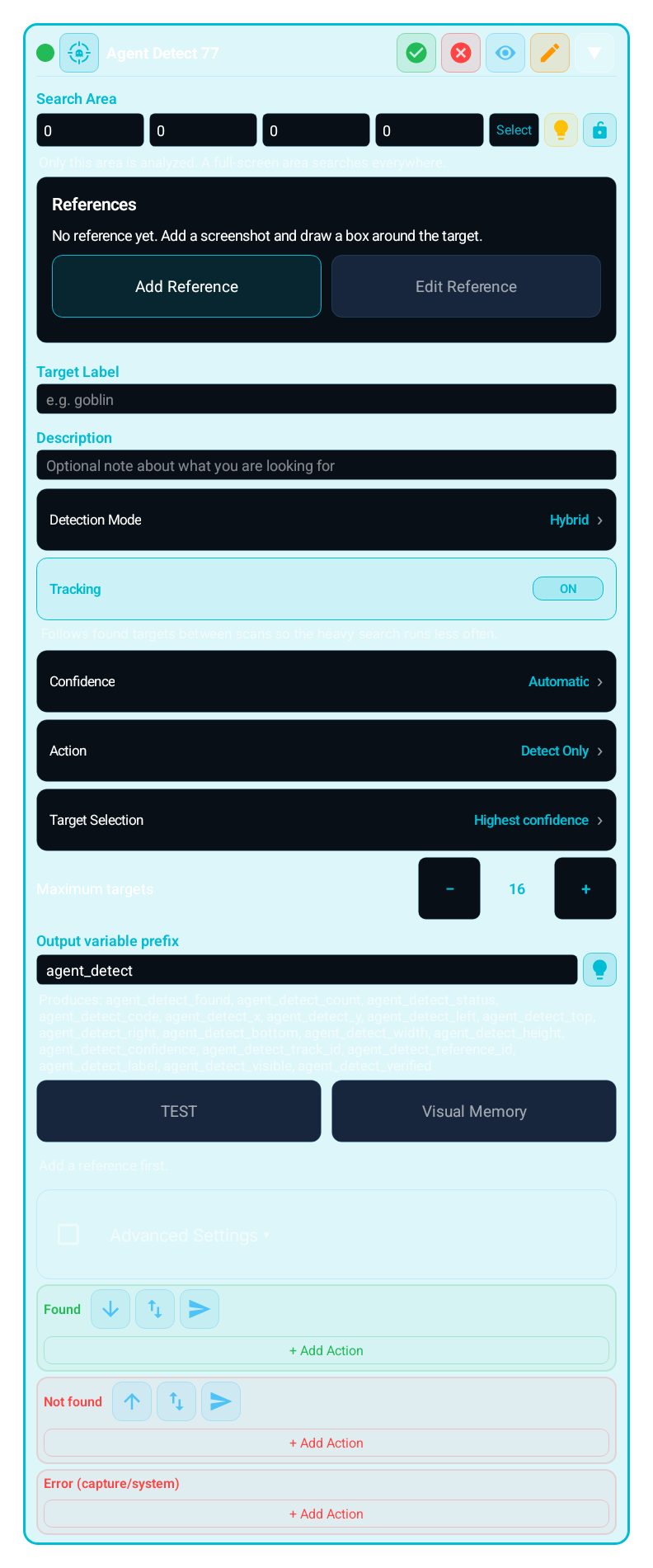
Finds targets inside the search area that visually resemble the examples you boxed in reference screenshots, tracks them from frame to frame, and reports the result through the FOUND, NOT FOUND and ERROR lanes. It combines shape, colour, texture and template similarity with the on-device image model when one is available. It runs fully offline: recognition happens on this device, and references and visual memory stay on it unless you share the macro privately, send it to another account, export it as ZIP or back it up to your Premium vault; those packages carry them, never unreviewed candidates. It does not understand the game, its rules or what an object is: it only measures visual similarity to your examples.
IMAGE, TEXT, COLOR and the other search blocks that use the Search Regions editor can define several search regions with + Add Region; OCR_VALUE tries its read regions in order. Inside a search region, Exclude Region skips noisy areas such as a HUD or a badge, and it applies only to the search region it belongs to. From 1.0.51 one search region can hold several excluded regions, each with its own shape and its own variable or Dialog binding.Coming soonv1.0.51
You can now assign a sticky anchor to each search region. This brings Region.sticky into the no-code surface so the region can stay aligned to anchors such as top_left, bottom_right, or center when screen geometry changes.
Search Duration (ms) defines one search window; 0 means a single look. Retry Mode in the Retry & Wait section is Off, Infinite Loop, Retry On True, Retry On False, Wait Until Found, or Wait Until Gone, so a block becomes a one-shot check, a controlled polling step, or a step that waits for a target to appear or to disappear. Retry Timeout (ms, 0 = unlimited) bounds the loop; Scan Rate (Hz) sets scans per second.
mScore, scale, and scan engine choices matter across themes, display sizes, and rendering differences. Smaller regions plus the right engine dramatically improve builder stability.
Use it when one template is not enough and the target changes size, angle or animation:
Find and follow a moving character or opponent in a game
Pick one of several similar targets by a rule (highest confidence, largest, closest to centre, leftmost…)
Confirm on a fresh frame that the target is still there right before tapping
Check after a tap that the target disappeared, the count decreased, the scene changed or a text appeared
Separate look-alike objects that are not the target by marking them as negative examples
"Add Block" → Search → "Agent Detect (AGENT_DETECT)"
SEARCH REGIONS: choose where the target can appear; use + Add Region for a separate area and Exclude Region for parts to skip inside a region, such as the HUD or the minimap. A full-screen region searches everywhere but is slower
ADD REFERENCE: add up to 4 screenshots that show the target with Capture Screen or Image From Device, and up to 8 images with Saved Template or Add from Cut-out
BOXES: the Reference Editor keeps the image on screen. In Draw mode drag a tight positive box around every visible target; box look-alikes that are not the target as negative (up to 16 boxes per set, each side at least 8 px). Zoom in, Zoom out, Fit and Undo sit in the same tool grid, and Reference tips point out boxes worth fixing
SAVE: in the editor header, tap Save to keep editing (the notice then says how many references carry a model signature) or Save and close to finish
DETECTION MODE: keep Hybrid · Recommended for most games; choose Identity · Strictest when only the exact object in your reference may be accepted, or Classic · No model when the target is unique and clearly coloured or top speed matters; Shape only (ignore colour) · Experimental finds targets whose colours change (night, elite or recoloured variants) but cannot tell species apart, and needs the references saved with "Prepare colour-independent search"
TEST: scans the live screen and shows the found boxes and the result code. Test mode never taps the screen. Mark each detection CORRECT or WRONG
ACTION: choose Detect Only or Detect + Tap; set the Target Selection rule and, for Detect + Tap, the Tap Point and the Interaction (Single tap, Double tap or Press and hold)
EXPECTED RESULT (optional, Detect + Tap only): after the tap, Target disappeared, Count decreased, Scene changed or Text appeared is checked on fresh frames for the verification time
Choose the output prefix and add actions to the FOUND, NOT FOUND and ERROR lanes
Each region is searched on its own; an excluded region is skipped only inside the search region it belongs to. A full-screen region searches everywhere. The region picker, screen guide and resolution adaptation work like the other search blocks
Per set: up to 4 screenshots (Capture Screen or Image From Device), up to 8 images from Saved Template or Add from Cut-out, and up to 16 boxes; a macro holds up to 16 reference sets. A positive box marks the target, a negative box marks a look-alike that is not the target
The target name (e.g. goblin) and an optional note. Stored as a label only; never executed as a command or a model prompt
Hybrid · Recommended: visual matching plus a check by the small image-recognition model built into the app; if the model cannot load or the set has no model signatures, it keeps working like Classic. Identity · Strictest: every target must pass the model check, so the references must be saved with model signatures; otherwise MODEL_UNAVAILABLE. Classic · No model: colour, shape and template only; fastest, but weaker with look-alikes. Shape only (ignore colour) · Experimental: ignores colour and checks every target with the model on a gray image, so it finds targets whose colours change but also every creature with a similar body, and cannot tell species apart; the references must be saved with "Prepare colour-independent search", otherwise MODEL_UNAVAILABLE. Every mode runs on this device, offline
Automatic: the threshold is measured on your reference screenshots. Manual: a minimum confidence from 0.30 to 0.99 (default 0.72)
Follows found targets between scans so the heavy full search runs less often
Highest confidence, Largest, Closest to center, Leftmost, Rightmost, Topmost, Bottommost, Currently tracked, By order number or Nearest to a point. Maximum targets 1–32 (default 16)
Detect Only or Detect + Tap. Tap Point is Center, Upper Center, Lower Center or Custom (horizontal and vertical position inside the box). Interaction: Single tap, Double tap (40–1000 ms between taps, default 120) or Press and hold (100–5000 ms, default 600); Double tap and Press and hold can each add a Random variation of up to half their time. Retries if the target moves away: 0–3 (default 1)
Detect + Tap only: Target disappeared, Count decreased, Scene changed or Text appeared. Verification time 200–10000 ms (default 1500). The result is written to agent_detect_verified; it does not change the FOUND outcome
Default agent_detect; letters, digits and _ (max 40, must not start with a digit). 18 variables: _found, _count, _status, _code, _x, _y, _left, _top, _right, _bottom, _width, _height, _confidence, _track_id, _reference_id, _label, _visible, _verified. _status holds the lowercase "found", "not_found" or "error" (not the lane names); _code holds OK or the typed code of the lane (for example NO_TARGET or CAPTURE_UNAVAILABLE). _targets lists every target found, the selected one first; loop over it with FOR_EACH
TEST scans the live screen. Test mode never taps the screen. CORRECT is stored as a reviewed positive and WRONG as a rejected negative example. In Visual Memory, Make Permanent, Mark Negative or Delete candidates; candidates are never used until you review them
Size range (0.1–5 × the reference, default 0.3–2.2), frames before accepting (1–10), collect new views for review, use text as evidence (up to 8 keywords), wait window (ms, 0 = single look, default 15000) and scans per second (1–30, default 8)
| Parameter | Description |
|---|---|
| Search Regions / Exclude Region | Each region is searched on its own; an excluded region is skipped only inside the search region it belongs to. A full-screen region searches everywhere. The region picker, screen guide and resolution adaptation work like the other search blocks |
| References | Per set: up to 4 screenshots (Capture Screen or Image From Device), up to 8 images from Saved Template or Add from Cut-out, and up to 16 boxes; a macro holds up to 16 reference sets. A positive box marks the target, a negative box marks a look-alike that is not the target |
| Target Label / Description | The target name (e.g. goblin) and an optional note. Stored as a label only; never executed as a command or a model prompt |
| Detection Mode | Hybrid · Recommended: visual matching plus a check by the small image-recognition model built into the app; if the model cannot load or the set has no model signatures, it keeps working like Classic. Identity · Strictest: every target must pass the model check, so the references must be saved with model signatures; otherwise MODEL_UNAVAILABLE. Classic · No model: colour, shape and template only; fastest, but weaker with look-alikes. Shape only (ignore colour) · Experimental: ignores colour and checks every target with the model on a gray image, so it finds targets whose colours change but also every creature with a similar body, and cannot tell species apart; the references must be saved with "Prepare colour-independent search", otherwise MODEL_UNAVAILABLE. Every mode runs on this device, offline |
| Confidence | Automatic: the threshold is measured on your reference screenshots. Manual: a minimum confidence from 0.30 to 0.99 (default 0.72) |
| Tracking | Follows found targets between scans so the heavy full search runs less often |
| Target Selection / Maximum Targets | Highest confidence, Largest, Closest to center, Leftmost, Rightmost, Topmost, Bottommost, Currently tracked, By order number or Nearest to a point. Maximum targets 1–32 (default 16) |
| Action / Tap Point | Detect Only or Detect + Tap. Tap Point is Center, Upper Center, Lower Center or Custom (horizontal and vertical position inside the box). Interaction: Single tap, Double tap (40–1000 ms between taps, default 120) or Press and hold (100–5000 ms, default 600); Double tap and Press and hold can each add a Random variation of up to half their time. Retries if the target moves away: 0–3 (default 1) |
| Expected Result | Detect + Tap only: Target disappeared, Count decreased, Scene changed or Text appeared. Verification time 200–10000 ms (default 1500). The result is written to agent_detect_verified; it does not change the FOUND outcome |
| Output Variable Prefix | Default agent_detect; letters, digits and _ (max 40, must not start with a digit). 18 variables: _found, _count, _status, _code, _x, _y, _left, _top, _right, _bottom, _width, _height, _confidence, _track_id, _reference_id, _label, _visible, _verified. _status holds the lowercase "found", "not_found" or "error" (not the lane names); _code holds OK or the typed code of the lane (for example NO_TARGET or CAPTURE_UNAVAILABLE). _targets lists every target found, the selected one first; loop over it with FOR_EACH |
| TEST / Visual Memory | TEST scans the live screen. Test mode never taps the screen. CORRECT is stored as a reviewed positive and WRONG as a rejected negative example. In Visual Memory, Make Permanent, Mark Negative or Delete candidates; candidates are never used until you review them |
| Advanced Settings | Size range (0.1–5 × the reference, default 0.3–2.2), frames before accepting (1–10), collect new views for review, use text as evidence (up to 8 keywords), wait window (ms, 0 = single look, default 15000) and scans per second (1–30, default 8) |
Scenario 1: Find and tap a moving opponent
Limit the search area to the play field
Add 3 screenshots that show the opponent in different poses; box every visible opponent as positive and look-alike teammates as negative
Scan with TEST and mark wrong detections as WRONG
Action: Detect + Tap, Target Selection: Closest to center, Retries if the target moves away: 1
Put the next step on FOUND, a short WAIT on NOT FOUND and a LOG on ERROR
Scenario 2: Confirm that the tap worked
Expected Result: Target disappeared, verification time 1500 ms
On FOUND, check agent_detect_verified with COMPARE
If it was not verified, LOG it and wait for the next round instead of tapping the same target again right away
MOST COMMON COMBINATIONS:
AGENT_DETECT + COMPARE: decide on agent_detect_confidence, agent_detect_count or agent_detect_verified
AGENT_DETECT + CLICK / SWIPE: in Detect Only mode, use the found target position through {agent_detect_x},{agent_detect_y}
AGENT_DETECT + LOG: record NOT FOUND and ERROR reasons with agent_detect_code
AGENT_DETECT + GROUP: handle one target per round inside a bounded loop
AGENT_DETECT + WAIT: wait briefly and retry when there is no target
Finds and tracks targets that resemble the examples you marked
WARNING:
Matching is based on visual similarity, not meaning: look-alike objects can match and strongly changed appearances can be missed; not every 3D angle or pose is guaranteed
Box every visible target in the reference screenshots: unboxed areas count as background when the automatic threshold is measured, so an unboxed target skews the threshold
Mark wrong look-alike objects as negative boxes instead of blindly lowering the threshold
Screen capture permission is required; without it the block takes the ERROR lane with PERMISSION_REVOKED or CAPTURE_UNAVAILABLE. Without a connected ERROR lane the error is logged once and the NOT FOUND lane runs
Identity mode needs the on-device model and references saved with model signatures; without them it reports MODEL_UNAVAILABLE, while Hybrid mode keeps working like Classic with visual features only. The status line under Detection Mode shows whether the model check is on for this set; if it is off, save the reference again
References are stored on this device. Macro ZIP export, backup and the block library carry the references (never unreviewed candidates); public community publishing does not. The block reports REFERENCE_MISSING until the recipient adds their own references
A block whose References are bound to a variable or Dialog, and a Dialog with an "Agent Detect references" field, cannot be saved to the block library; export the complete macro as ZIP to carry them
The same block at three levels: a quick start, the real options, and professional techniques.
Agent Detect finds objects inside the search area that visually resemble the target you boxed in reference screenshots. Simplest setup: choose the search area, use Add Reference to add 1–4 screenshots that show the target, draw a tight positive box around every visible target in the Reference Editor and tap Save and close, keep Detection Mode at Hybrid · Recommended, check the result with TEST, and put the action on the FOUND lane. The block runs fully offline and recognizes targets on the device with the small image model it uses; references and visual memory stay on the device unless you share the macro privately, send it to another account, export it as ZIP or back it up to your Premium vault, and those packages never carry unreviewed candidates. It does not understand the game or what an object is; it only measures visual similarity to your examples.
The result splits into three lanes. FOUND (code OK) runs when the selected target passes the confidence threshold and stays stable for the number of frames set in "Frames before accepting". NOT FOUND runs with the last code it saw when no target is confirmed within the wait window: NO_TARGET (nothing in the area), AMBIGUOUS_TARGET (something similar was seen, but not with enough certainty) or TARGET_LOST (the tracked target was lost). ERROR is for cases where the screen or the settings cannot be used: CAPTURE_UNAVAILABLE, REFERENCE_MISSING, INVALID_ROI, MODEL_UNAVAILABLE, TIMEOUT (capture and analysis did not finish within their own budget), PERMISSION_REVOKED and RUNTIME_ERROR. Without a connected ERROR lane the error is logged once and the NOT FOUND lane runs. Every outcome writes 18 prefixed variables: _found, _count, _status, _code, _x, _y, _left, _top, _right, _bottom, _width, _height, _confidence, _track_id, _reference_id, _label, _visible, _verified. Coordinates are 0 when no target was selected.
With Detect + Tap, the block revalidates the selected target on a fresh frame right before tapping. If the target vanished in between, it runs as many fresh scans as "Retries if the target moves away" allows (0–3); if it is still missing, nothing is tapped and the NOT FOUND lane runs with TARGET_LOST, so stale coordinates are never tapped. The tap goes to the Tap Point of the box (Center, Upper Center, Lower Center or Custom); tapped targets are remembered and the next round picks the next target (except for the "Currently tracked" and "By order number" selections). When an Expected Result is set, fresh frames are watched for the verification time after the tap and the result is written to _verified; a failed verification does not change the FOUND outcome. In the code editor the same engine is called with region:agentDetect(macroScopeId, referenceSetId, options); the call returns a status, a code and a target table and never taps by itself.
Small, reproducible examples that combine several blocks — build them straight into your own macro.
This block is useful on its own — but it shines when paired with the right partners.
Add a second decision gate on agent_detect_confidence, agent_detect_count or agent_detect_verified, and stop the flow after an unverified tap.
Record NOT FOUND and ERROR reasons with agent_detect_code; NO_TARGET, AMBIGUOUS_TARGET and CAPTURE_UNAVAILABLE need different fixes.
Each round handles one target; Detect + Tap remembers tapped targets, so the next round moves on to the next one.
In Detect Only mode, use the {agent_detect_x},{agent_detect_y} position in your own gesture; prefer Detect + Tap when the target must be revalidated before the tap.
IMAGE is faster for fixed interface icons that never change; keep Agent Detect for targets whose size, pose or animation changes.
Leaving some visible targets unboxed in a reference screenshot. Unboxed areas count as background when the automatic threshold is measured, which raises the threshold needlessly. Fix: mark every visible target with a positive box.
Only moving the confidence threshold when a look-alike matches by mistake. Fix: add that object as a negative box or mark it WRONG in TEST.
Leaving the ERROR lane empty and assuming NOT FOUND always means "no target". Without a connected ERROR lane, capture and permission errors also run the NOT FOUND lane. Fix: connect the ERROR lane or compare agent_detect_status with "error" (the values are the lowercase "found", "not_found" and "error").
Assuming a failed Expected Result sends the block to the NOT FOUND lane. Verification does not change the FOUND outcome. Fix: branch on agent_detect_verified inside the FOUND lane.
Assuming the block understands the game or what the target is. Agent Detect only measures visual similarity to your examples and does not guarantee every 3D angle. Fix: add examples from different angles and sizes, and verify critical steps with Expected Result.
Assuming Shape only tells species apart. Colour is ignored, so other creatures with a similar body (for example a same-sized monster of another species) are found too, and teaching one species as a negative reference can drop look-alike species as well. Fix: use Hybrid · Recommended when species matter; choose Shape only for the same target whose colours change.
To let the user choose what to look for when the macro starts, bind References to an "Agent Detect references" field of a Dialog with its lightbulb: the field lists this macro’s saved sets, lets the user add and edit references, and Save confirms the selection. Such a block does not travel through the block library; export the complete macro as ZIP.
Almost every setting has a lightbulb: the reference set, label and description, mode, confidence, target selection, action, tap and interaction timing, expected result, size range, and the search and excluded regions. Values are read once when the block starts; a number outside its range is clamped, an unusable value (an unknown mode name, text in a number field) sends the block to the ERROR lane with RUNTIME_ERROR, and an invalid reference set reports REFERENCE_MISSING.
With "Collect new views for review" on, new looks seen with high confidence are kept as candidates and are never used until you choose "Make Permanent" in Visual Memory. Review candidates regularly and teach wrong ones with "Mark Negative".
Keep the search area tight and scans per second moderate (default 8). With Tracking on, the heavy full search runs less often, and the engine can also delay the next scan by its own suggested interval. Classic · No model is the fastest mode for a unique, clearly coloured target; Hybrid · Recommended tells look-alikes apart better.
When one macro has several Agent Detect blocks, give each an output prefix named after its target (for example, enemy or chest) so their variables never collide.
If you publish the macro publicly, the references do not travel with the package; the block reports REFERENCE_MISSING until the recipient adds references from their own screenshots. A macro ZIP export does carry the references (never unreviewed candidates).
In TEST, Live Tracking keeps scanning and shows each new result; Stop ends it. It also stops by itself on REFERENCE_MISSING, INVALID_ROI, MODEL_UNAVAILABLE, PERMISSION_REVOKED or RUNTIME_ERROR. Test mode never taps the screen.
The Lua below is what the Code Editor generates for this block with sample settings. Adding cases, branches, actions or loops, or changing settings, extends the generated code accordingly. Study it to see what the block does under the hood, to learn Lua, or to copy and adapt it. Use the Copy button (top-right) to paste it into the Code Editor, or “Try in Editor →” to run it in the live editor.
local agent_detect_found = nil
local agent_detect_count = nil
local agent_detect_status = nil
local agent_detect_code = nil
local agent_detect_x = nil
local agent_detect_y = nil
local agent_detect_left = nil
local agent_detect_top = nil
local agent_detect_right = nil
local agent_detect_bottom = nil
local agent_detect_width = nil
local agent_detect_height = nil
local agent_detect_confidence = nil
local agent_detect_track_id = nil
local agent_detect_reference_id = nil
local agent_detect_label = nil
local agent_detect_visible = nil
local agent_detect_verified = nil

do
 local _adR = Region(0, 0, 540, 960)
 local _adWin = 5000
 local _adGap = math.max(1, math.floor(1000 / 8))
 local _adK = "block:00000000-0000-4000-8000-000000000001"
 __mh_agent_detect_state = __mh_agent_detect_state or {}
 local _adS = __mh_agent_detect_state[_adK] or { acted = {}, order = {}, lastAt = 0, readyAt = 0 }
 __mh_agent_detect_state[_adK] = _adS
 local _adO = {
  stateKey = _adK, label = "guard", profile = "best",
 }
 local function _adCall()
  _adO.syncExcluded = _adO.intent == nil or _adO.intent == "scan"
  local _t0 = System.currentTime()
  local _r
  local _fn = _adR.agentDetect
  if type(_fn) ~= "function" then
   _r = { status = "error", code = "MODEL_UNAVAILABLE", error = "agent_detect_host_unsupported" }
  else
   local _ok, _v = pcall(_fn, _adR, "00000000-0000-4000-8000-000000000002", "00000000-0000-4000-8000-000000000003", _adO)
   if not _ok then
    local _e = tostring(_v)
    for _, _k in ipairs({ "CompatStopException", "Script durduruldu", "BUDGET_", "RATE_LIMIT_" }) do
     if string.find(_e, _k, 1, true) then error(_v, 0) end
    end
    _r = { status = "error", code = "RUNTIME_ERROR", error = "agent_detect_call_failed" }
   elseif type(_v) ~= "table" or (_v.status ~= "found" and _v.status ~= "not_found" and _v.status ~= "error") then
    _r = { status = "error", code = "RUNTIME_ERROR", error = "agent_detect_invalid_result" }
   else
    _r = _v
   end
  end
  local _hint = math.min(1000, math.max(0, tonumber(_r.nextDelayMs) or 0))
  if _r.status == "error" then
   _hint = math.max(250, _hint)
   _r.soft = _r.code == "TIMEOUT" or _r.code == "CAPTURE_UNAVAILABLE"
  end
  _adS.lastAt = _t0
  _adS.readyAt = System.currentTime() + _hint
  return _r
 end
 local function _adPace()
  local _due = math.max(_adS.readyAt, _adS.lastAt + _adGap) - System.currentTime()
  if _due > 0 then wait(math.min(1000, math.ceil(_due))) end
 end
 local function _adPick(_r)
  local _t = _r.status == "found" and type(_r.targets) == "table" and _r.targets[tonumber(_r.selected) or 0] or nil
  return type(_t) == "table" and _t or nil
 end
 local _adT0 = System.currentTime()
 local _adRes, _adMiss
 for _adPoll = 1, math.floor(_adWin / _adGap) + 2 do
  _adPace()
  _adRes = _adCall()
  if _adRes.status == "found" or (_adRes.status == "error" and not _adRes.soft) then break end
  if not _adRes.soft then _adMiss = _adRes end
  if _adWin <= 0 or System.currentTime() - _adT0 >= _adWin then
   break
  end
 end
 if _adRes.soft and _adMiss ~= nil then _adRes = _adMiss end
 local _adOut = _adRes.status
 local _adCode = tostring(_adRes.code or "RUNTIME_ERROR")
 local _adWhy = tostring(_adRes.error or "")
 local _adSel = _adPick(_adRes)
 if _adOut == "found" and _adSel == nil then
  _adOut = "not_found"
  _adCode = "NO_TARGET"
 end
 local _adOk = false
 local _adT = (_adOut == "found" and _adSel) or {}
 agent_detect_found = _adOut == "found"
 agent_detect_count = (_adOut ~= "error" and (tonumber(_adRes.count) or 0)) or 0
 agent_detect_status = _adOut
 agent_detect_code = _adCode
 agent_detect_x = tonumber(_adT.x) or 0
 agent_detect_y = tonumber(_adT.y) or 0
 agent_detect_left = tonumber(_adT.left) or 0
 agent_detect_top = tonumber(_adT.top) or 0
 agent_detect_right = tonumber(_adT.right) or 0
 agent_detect_bottom = tonumber(_adT.bottom) or 0
 agent_detect_width = tonumber(_adT.width) or 0
 agent_detect_height = tonumber(_adT.height) or 0
 agent_detect_confidence = tonumber(_adT.confidence) or 0
 agent_detect_track_id = tonumber(_adT.trackId) or 0
 agent_detect_reference_id = tostring(_adT.referenceId or "")
 agent_detect_label = tostring(_adT.label or "")
 agent_detect_visible = _adT.visible == true
 agent_detect_verified = _adOk
 if _adOut ~= "error" then _adS.lastErr = nil end
 if _adOut == "found" then
  _lastMatch = _adSel.match
 elseif _adOut == "error" then
  _lastMatch = nil
  if _adS.lastErr ~= _adCode then
   _adS.lastErr = _adCode
   System.log("AGENT_DETECT error [AGENT_DETECT]: " .. _adCode .. (_adWhy ~= "" and (" (" .. _adWhy .. ")") or ""))
  end
 else
  _lastMatch = nil
 end
end
Note: generated code can evolve across versions; helper names (e.g. _reg1, m1) and internal optimizations may change. The logic and the called APIs reflect the block’s behavior.
The guidance below is not identical for every block. It summarizes the professional controls that most often repeat in the selected block family.
Keep the search close to the target. Smaller regions are faster and more stable.
Exclude static noise, badges, animations, or reflective areas to reduce false matches.
Timeout and scan rate define whether the block acts as a single check or controlled polling step.
mScore, scale, and engine choice must be tuned together for theme, resolution, and rendering differences.
OCR_VALUE writes the number it reads to its result variable (default ocr_val); TEXT writes the text it passed through its find/replace step to the Save Read Value variable (default ocr_val). In Match Variables, the score variable (0.0–1.0 confidence) and the X/Y/W/H variables carry the match confidence and position into later blocks: branch on the score with COMPARE, and in CLICK bind the coordinates to them with {x} or turn on Click on match. _lastMatch is the last match that Click on match uses; _lastOcrText is kept only for older CUSTOM_CODE scripts.
TOUCH and TOUCH_BREAK cover recipe-style touch flows. Raw pointer choreography such as Touch.down, Touch.move, Touch.up, Touch.dispatch, Touch.reset, Touch.breakAll, and Touch.releaseAfter is not exposed as a first-class builder block.
Touch.downTouch.moveTouch.upTouch.dispatchTouch.resetTouch.breakAllTouch.releaseAfterThe DIALOG block and dialog designer cover a bounded field set in the builder: Info Text, Text Input, Checkbox, Description, Radio Group, Dropdown, Multi Select, Tab Group, Date Time, Number Range, Slider, Image Picker, Color Picker, File Picker, Recorder Picker, Tag, Signature, and Spacer. The buttons are designed too: the Positive button and Negative button tabs set each button’s text, background, and border color, corner radius, and minimum height next to a preview. Freer Setting.builder composition, multi-step wizard flows, and mixed HUD/dialog choreography still do not map 1:1 into the builder.
Coming soonv1.0.51Two more fields: Agent Detect references (agent_detect_editor) lets the user pick a saved reference set or add and edit references, and Save confirms the selection; Navigation setup editor (navigation_editor) edits a saved map, marker and route from the Dialog and returns the setup and route selection without moving the character.
Setting.builderDialogHudTextViewAgentDetectEditorNavigationEditorHTTP_GET, HTTP_POST, and HTTP_PUT cover common fixed-method flows; HTTP_REQUEST covers one bounded request with method, header lines, body, content type, query parameters (GET and DELETE), timeout, and a bounded retry. These blocks never throw; they write the status code (-1 on a network failure). Cookie handling, chained request objects, and lower-level client flows still need the code editor.
Request()Request.setCookieRequest.getCookiesCUSTOM_CODEThe MAP, LIST, JSON_PARSE, REGEX_MATCH, and METRICS blocks cover the everyday cases: map actions, a static list, reading a value from a JSON path, regex match, find, replace, and split, and metrics actions. The rest of the Map, Array, JSON, Regex, and Metrics APIs (for example Array sort, filter, and map) is broader than the builder recipe model and stays on the CUSTOM_CODE and code editor side.
MapArrayJSONRegexMetricsRuntime helpers, raw Request objects, Lua built-ins such as print/pcall/xpcall, and free-form object chaining patterns are represented through CUSTOM_CODE or the code editor.
RuntimeRequestprintpcallxpcallCUSTOM_CODEEach block card now exposes an independent breakpoint toggle. When enabled, the breakpoint preference is stored with the block.
Breakpoints are only emitted into runtime code when Debug Mode is enabled from Visual Builder settings. When Debug Mode is off, breakpoints stay saved but do not pause execution.
Use ASSERT for fail-fast validation, and use breakpoints for step-by-step tracing and controlled pauses in the same flow.
Variables defined with SET_VARIABLE are accessible throughout the macro (global scope). All blocks can read/write the same variable.
However, a variable defined inside a GROUP will be 'nil' (undefined) until the GROUP executes. Blocks outside the GROUP using this variable may produce unexpected results.
FOR_EACH loop variables (item and index) only carry valid values inside the loop body. Outside the loop they are outside local scope and should not be used.
TRY_CATCH error variable is only valid within the catch block. If the try block succeeds, the catch branch is not entered and the error variable remains undefined.
TIP: Before using a variable inside a GROUP, assign a default value with SET_VARIABLE outside the GROUP. This way the variable won't be nil even if the GROUP has not run.
You can embed variable values and calculations into text fields using {{ expression }} syntax. Expressions inside double curly braces are evaluated as Lua code and the result is inserted into the text.
{{ expression }}Skor: {{ score + 1 }} → "Skor: " .. tostring(score + 1){{ name }} kazandı! → tostring(name) .. " kazandı!"X:{{ x }} Y:{{ y }} → "X:" .. tostring(x) .. " Y:" .. tostring(y)Expressions are checked by the sandbox policy. Security-sensitive calls like loadstring, require, debug are automatically blocked.
Keep scan regions as small as possible — improves speed, reduces false matches.
Always add an exit condition when using infinite loops (BREAK, timeout, or conditional exit).
Use network operations and error-prone steps inside TRY_CATCH.
If you need global error handling, use the Error Handler (ERROR_HANDLER) block as a singleton in the project.
Small coordinate offsets (CLICK/SWIPE) improve tap accuracy across different DPI and screen scales.
Customize macros with Dialog block — different parameters each run.
Define repeating steps once with GROUP_CALL, call from many places.
Cross-macro local library
The Local Shared Macro Area moves blocks, variables, dialog fields, gallery assets, and imported media dependencies between macros on the same device. It is device-local, not cloud sync, not Firebase sharing, and not a replacement for public macro sharing.
Professional usage model: put a reusable login flow, common scan region, shared dialog form, variable group, template image, color profile, replay recording, or imported PLAY_SOUND media file into the shared area from one macro, then import it from the relevant + menu in another macro.
VISUAL_BLOCKSVARIABLESDIALOG_FIELDSTEMPLATE_IMAGECOLOR_SWATCHREPLAY_RECORDMEDIA_FILEWhen one item or a multi-selection is active, the shared-area button can copy the selected part from the workspace, group, true/false action branch, dialog, and variables surfaces into the device-local library.
The shared-area entry under the + menu imports the selected item into the surface that opened it. Main workspace, group, action branch, dialog, and variables each receive the compatible item type.
Gallery items include template images, color swatches, replay records, and imported audio/media files. They can move between macros on the same device so repeated templates, colors, recordings, and PLAY_SOUND media assets do not need to be captured again.
The shared area is not a permanent dumping ground. Delete stale shared items from the shared-library panel; imports create a copy in the target macro and do not rewrite the source macro flow.
AI assistant
Tell MH AI what you want in plain language; it proposes the right block sequence and lands it in the workspace after you approve. In the current release it works with cloud providers such as Gemini, Claude, and OpenAI; on-device local models are on the roadmap.