
Logic Workspace
Build your macro as a flow
Instead of stacking blocks in a list you connect them. Which step follows which, where a condition branches, and where a dialog answer carries the flow are all visible on one screen.
Documented for app version 1.0.51Updated:
Logic Workspace
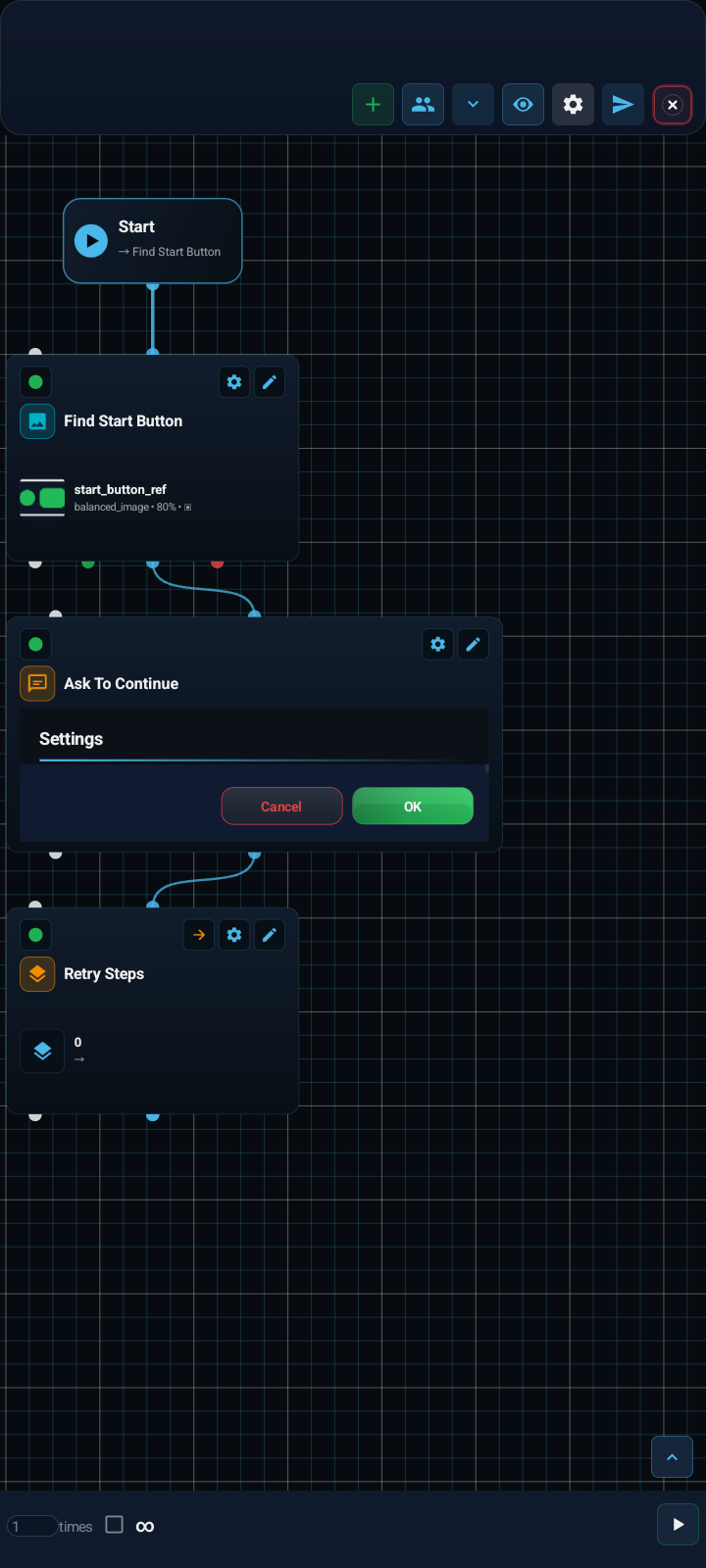
A flow running from the Start card into an image-match block, on to a dialog with its live preview, and finally into a group. The green and red dots beside the cables are a condition's true and false branches.
READ THIS FIRST
The Logic Workspace is not another view of the no-code list
The two surfaces edit the same macro but keep separate documents. A block you add in the no-code workspace does not appear here, and a flow you build here does not appear in the no-code list. This is deliberate, not a fault: it stops two editors corrupting one document. If the canvas shows nothing but the Start card the first time you open it, that is why — your macro is not lost, this surface simply has its own empty document.
FLOW
An unwired block never runs
The Start card is the only entry point of the flow. Dropping a block on the canvas does not run it; you have to drag a cable from Start to it. A block with no incoming cable is stored disabled and never reaches code generation. The small circles on a card are its ports: the one on top is the input, the ones underneath are outputs. Conditional blocks carry two — the green one is the true branch, the red one the false branch.
PORTS
A cable only joins two compatible ports
Connections are typed; if you try to join two incompatible ports the app refuses and asks for a compatible output and input. When a card carries many ports, the extra ones are summarised as “+N more ports”.
- Control input and Next
- The main flow: the order in which steps run.
- True and false branches
- The green and red outputs of a conditional block.
- Conditions, Detectors and Flow body
- The steps that sit inside a block: the blocks that form a condition, the search blocks evaluated together, and the body of a loop or group.
- Recovery
- The input and output of the recovery path that runs when something goes wrong.
- Switch case and Switch default
- One output per case; the unknown and error outcomes of decision blocks get their own outputs too.
- Event guard bypass
- The path the flow takes when an Event State skips a block.
CARD ANATOMY
What sits on a card
The top row holds three things: the dot on the left enables or disables the block, the gear opens that block's settings, the pencil renames it. Below it sits the block's icon and name, and at the bottom the values it carries — on an image-match block, for example, the template name and the match threshold. Card size and canvas zoom are independent controls; used together they make a crowded flow readable.
STATE BADGES
Every card says whether it will run
A card’s state is decided in this order: a block with a Validation error must be fixed first. A Disabled block is switched off. An Unreachable block is on, but no path from Start leads to it, so it never runs. An Event guarded block depends on an Event State block and is skipped while that state is off. Everything else is Enabled.
VISIBILITY
Zoom out and cards become shapes
Past a certain distance the cards stop carrying text and collapse into plain vector shapes. That is a deliberate view rather than a limitation: it lets you see a flow of hundreds of blocks at once and follow where the cables go. Zoom back in and the cards return in full detail. The centre button only centres — it does not change your zoom level.
CANVAS
Cut and rewire cables, park Start
Dropping a cable on empty canvas cuts it; dropping its end on another port rewires it. While you drag near an edge the canvas pans by itself. You can park the Start card anywhere, independently of the flow, and it keeps its place when the layout is rebuilt. Cables follow the ports on the cards while you drag, zoom or use compact cards.
DIALOG BLOCK
Every dialog answer is its own output
A dialog block draws a live preview on its card: you see the title, the fields and the buttons exactly as the user will. Its real power is in the outputs — every answer you define in the dialog appears as its own port on the card. "OK" can take one path and "Cancel" another, and you built that branch without writing a separate condition block.
STRUCTURE
Groups fold the flow away
The arrow on a group card takes you inside it and a breadcrumb appears in the header; the back arrow steps you out. Inside, only that group's blocks are shown, so a long flow can be split into parts that mean something. Note that a group you entered from inside a branch hands you back into that branch on the way out, not to the root — returning to the root takes a second press.
SELECTION AND LIBRARY
Copy, move and share several blocks
Press and hold a card to start a multi-selection. The selection bar offers copy, paste, delete and adding to the Shared Library. Copies get new identities and their own wiring, and inserting several blocks is one undoable step. The Shared Library carries blocks, variables, Dialog fields and gallery items between macros.
TEST
Test the flow, then single blocks
The Test flow button on the bottom rail runs the whole macro; even inside a group it starts the entire flow, not just that group. To try one block, use that node’s own Test button. If you close the Logic Workspace with one node selected, the screen guide shows only that node’s regions.
LIGHTBULB
Bind values to variables and Dialog fields
Logic node settings use the same number and coordinate fields as the no-code workspace, so the lightbulb works the same way here: {x}, {t} and {r} bind a field to a variable, an earlier block’s output or a Dialog field.
LOOP
Newv1.0.51Project loop count
The project loop count in the Logic loop settings can be bound with the lightbulb to a variable, a Dialog field or a random range. A bound count always stays finite and at least 1; a random range is drawn once when the outer loop starts. If you want continuous looping, choose it separately. The Random option in the bulb menu arrives in the same version; on other supported number fields it draws a new value on every block call.
MH-AI AND LOCK
MH-AI proposals and the secret password
MH-AI can apply a proposal you explicitly approve to the Logic target; if the project changed or the approval went stale while it was prepared, the proposal is rejected instead of overwriting your newer edits. For a macro with a secret password, the Logic Workspace asks for it every time it opens, from the Home screen and from the control panel alike.