Lua Script Guide

Advanced automation on the default launch Lua runtime.

Completion, parameter hints and type checking. Installation instructions and downloads are hosted on GitHub.

Documented for app version 1.0.51Updated:

Runtime Scope

The 800+ API methods claim applies to the default launch Lua runtime. The native Lua 5.4.8 runtime is experimental and not the default yet.

Guide Map

Mobile quick navigation

7 sections

AI assistant

Draft Lua scripts with MH AI in natural language

Tell MH AI what you want; it drafts Lua aligned with ScriptApiCatalog while the sandbox boundary stays intact. In the current release it works with cloud providers such as Gemini, Claude, and OpenAI; on-device local models are on the roadmap.

Learn more →

Code Editor

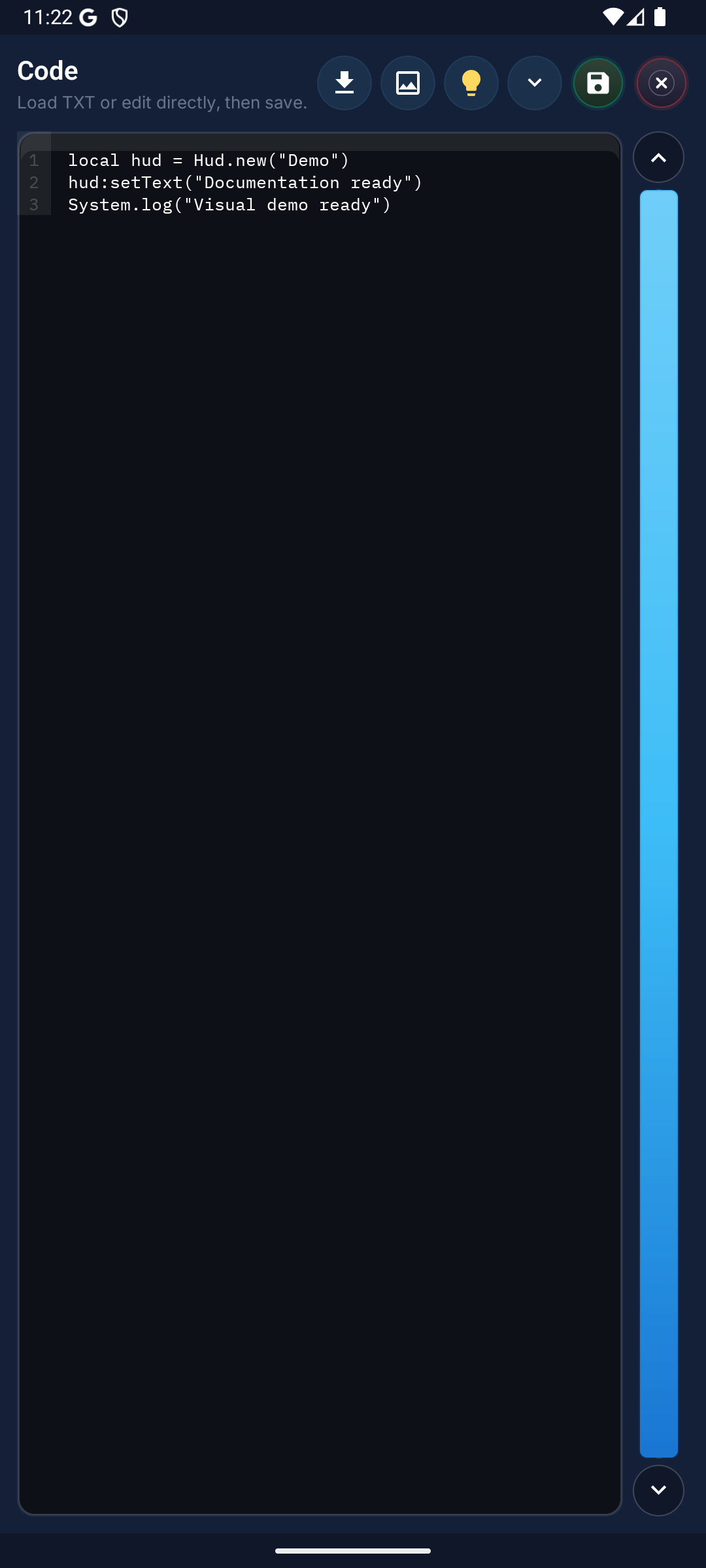
Write Lua code in the dark-themed editor with line numbers. The code editor opens directly from the control panel and allows code changes even while macros are running. Use toolbar buttons to import code from external files, work with the template gallery, or speed up development with ready-made code snippets.

Toolbar:

  • Import: Import code from external files. Include external Lua files into your project.
  • Gallery: Access template images. Insert saved template names into your code.
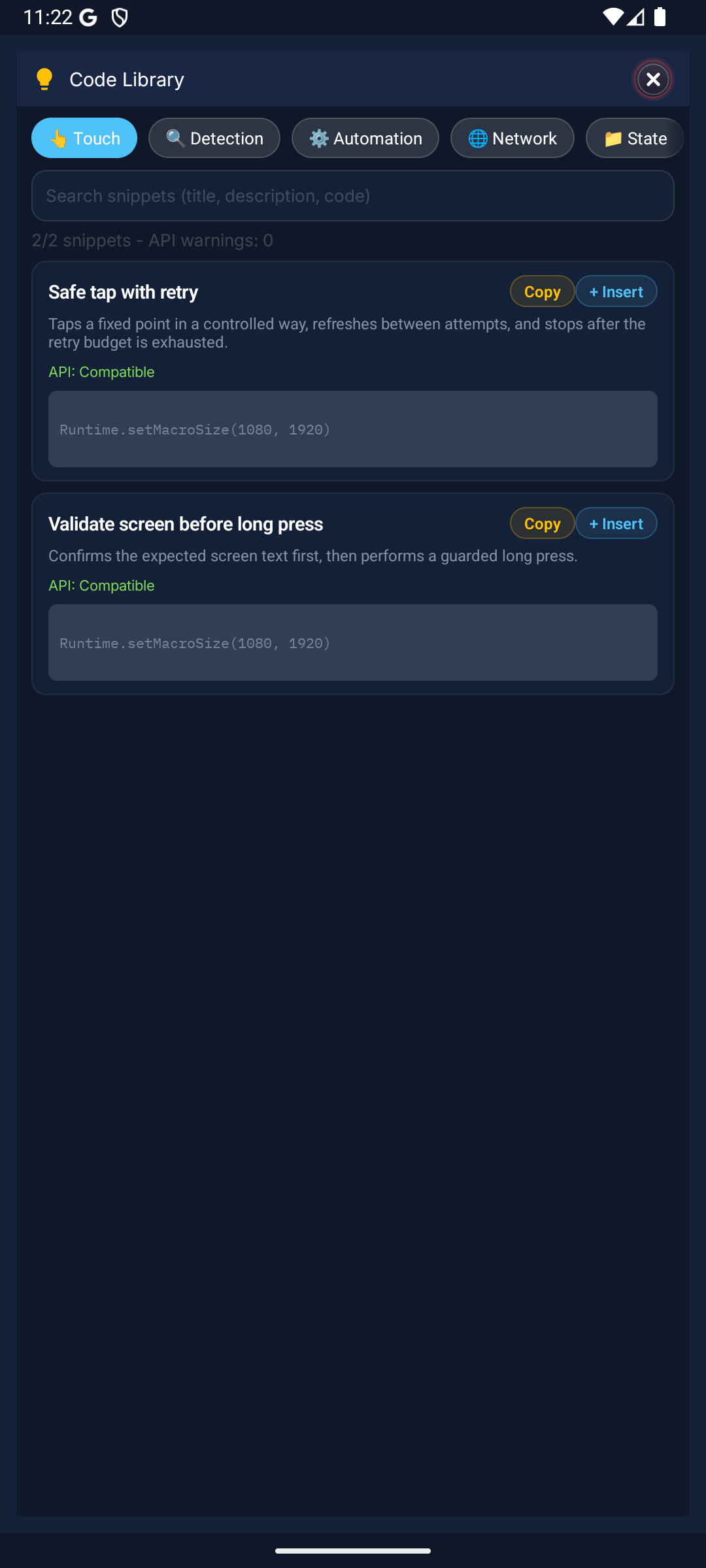
  • Snippets: Add frequently used operations with one tap using ready-made snippets. Region scanning, tapping, loops, and more.

Production flow in the code editor

The red areas teach code users the toolbar first, then the Lua surface, then ready-made patterns.

Clean code editor
1ToolsSave, run, gallery, and snippet entries live here.
2LuaThe macro flow is read, written, and hardened here.
3AssistReady-made patterns and API names give a fast start for production code.

Editor

Code editor

Snippets

Code snippets

Lua Editor - Try It

Write Lua code in the editor below. Use Ctrl+Space for autocomplete with Macro Handler APIs.

Macro Handler - Lua Editor

Tab inserts a two-space indent. To leave the editor, press Esc, then Tab. Suggestions: Ctrl+Space.

Basic Pattern

Every macro script follows a four-step structure: first cache the screen capture, then define the scan region, search for the target template, and apply an action when found. This pattern is the foundation of all macros and can be adapted to any scenario.

lua
Snap.screenRefresh()
local area = Region()
local tpl = Asset.image("start_btn")
local hit = area:find(tpl)
if hit then
  quickTap(hit)
  wait(500)
end
Snap.screenRefresh()Caches the screen capture. All subsequent Region.find() calls use this cached image.
Region()Defines the scan region (x, y, width, height).
area:find(tpl)Searches for template in region; returns location if found.
quickTap(hit)Taps the found location.

Production Pattern

In real scenarios, combining timeout, error handling, and loops yields more stable results. The pattern below keeps searching for the target within the specified time, catches errors without stopping the script, and exits the loop after applying the action when found. This pattern is recommended for all production use.

lua
local deadline = System.currentTime() + 15000
while System.currentTime() < deadline do
  local ok, result = pcall(function()
    Snap.screenRefresh()
    local r = Region()
    return r:find(Asset.image("reward_btn"))
  end)
  if ok and result then
    quickTap(result)
    toast("Reward tapped")
    break
  end
  wait(500)
end
pcall: Catches errors instead of stopping the script.
Timeout: Define a deadline with System.currentTime() to eliminate infinite loop risk.

Macro Handler Lua dialect

Scripts run with standard Lua 5.2 syntax. Right before running, the app rewrites a few shortcuts you may know from other languages into standard Lua. The shortcuts are optional, and line numbers in error messages still point at the script you wrote.

  • a != bbecomesa ~= b

    Not-equal comparison. Text inside quotes is left untouched.

  • a && b || cbecomesa and b or c

    Logical AND and OR become the Lua keywords.

  • // notebecomes-- note

    Only // at the start of a line becomes a comment. A // after code is not a comment; see the warning below.

  • score += 10becomesscore = score + (10)

    -=, *=, /=, %=, and ..= work too. The assignment must stand alone on its line; if ... then x += 1 end is not rewritten.

  • continuebecomesgoto <label>

    Written on its own line inside a for, while, or repeat loop; it moves on to the next iteration.

  • hit.getX()becomeshit:getX()

    Object methods such as mScore, scale, timeout, find, getX, getY, and click are called with a colon even when written with a dot. Calls on the Lua standard libraries (math, string, table, os, and the others) and on the Point, Region, Color, JSON, KV, Regex, Collection, Array, Macro, and Metrics tables stay as written, so Point.scale(...) and Regex.find(...) keep their dot.

Written with shortcuts

lua
// Tap five slots in a row, skipping the locked ones
local tapped = 0
for slot = 1, 5 do
  if slot == 2 || slot == 4 then
    continue
  end
  quickTap(Point(140 + slot * 150, 1650))
  tapped += 1
  wait(300)
end
if tapped != 0 && tapped < 5 then
  toast("Tapped " .. tapped .. " slots")
end

The standard Lua that runs

lua
-- Tap five slots in a row, skipping the locked ones
local tapped = 0
for slot = 1, 5 do
  if slot == 2 or slot == 4 then
    goto continue
  end
  quickTap(Point(140 + slot * 150, 1650))
  tapped = tapped + 1
  wait(300)
  ::continue::
end
if tapped ~= 0 and tapped < 5 then
  toast("Tapped " .. tapped .. " slots")
end

// is only a comment at the start of a line

A // written after code (x = 1 // note) or a // b is read as Lua 5.4 floor division, and the security policy stops the script before it starts. Use -- for end-of-line comments and math.floor(a / b) for integer division. Bitwise operators (&, |, a lone ~, <<, >>) are rejected for the same reason; ~= is fine.

  • Declare variables with local. A line that starts with var stops the script before it starts with a “not valid Lua syntax” error.
  • Join text with ..; + only adds numbers and fails on text that is not a number.
  • If you share a script outside the app, write standard Lua instead of the shortcuts.

Snippet Gallery

Common automation patterns. Each snippet runs on the default launch runtime; replace image names and ids with your macro's own. Snippets with a version badge need that app version.

14 snippets

Image Search with Timeout

Searches for a target image within a window, taps when found, and quietly gives up otherwise.

lua
local deadline = System.currentTime() + 8000
while System.currentTime() < deadline do
  Snap.screenRefresh()
  local hit = Region():find(Asset.image("start_btn"))
  if hit then
    quickTap(hit)
    return
  end
  wait(250)
end

HTTP GET with Retry

A GET request with timeouts and automatic retries: it is tried up to 3 times, with growing waits, on network errors and 408, 425, 429, 500, 502, 503, 504 responses. Code -1 means no HTTP response was received; getData() returns the reason when one is known.

lua
local req = Request("https://api.example.com/v1/health")
req:setTimeout(5000, 10000)
req:setRetry(3, 500, 4000)
local res = req:get()
local code = res:getResponseCode()
if code >= 200 and code < 300 then
  System.log("Health: " .. res:getData())
elseif code == -1 then
  toast("No response: " .. res:getData())
else
  toast("HTTP " .. code)
end

Color State Detection

Looks for matches of a target color in a region; ideal for UI state checks.

lua
Snap.screenRefresh()
local region = Region(100, 200, 800, 400)
local hits = region:findAll(Asset.color("#FF3366"):mScore(0.85))
if #hits >= 1 then
  toast("Active state detected")
else
  toast("Idle")
end

Two-finger Pinch Gesture

Touch.pinch sends both fingers as one gesture: they start 600 pixels apart and end 200 pixels apart (zoom out).

lua
local centre = Point(540, 960)
if not Touch.pinch(centre, 600, 200, 400) then
  toast("Pinch was not dispatched")
end

Region OCR with Number Extraction

Reads a region with Latin-script OCR and extracts the first numeric value.

lua
Snap.screenRefresh()
local scoreArea = Region(80, 60, 360, 80)
local text = scoreArea:readText({ ocrScript = "latin" }) or ""
local n = tonumber(text:match("(%d[%d%.]*)"))
if n then
  toast("Score: " .. n)
end

Safe Loop with pcall

Unexpected errors stop one iteration without stopping the script; they are logged and the loop continues.

lua
for i = 1, 50 do
  local ok, err = pcall(function()
    Snap.screenRefresh()
    -- ... your iteration body ...
  end)
  if not ok then
    System.log("iter " .. i .. " failed: " .. tostring(err))
  end
  wait(200)
end

Lua Helper Functions

Every run adds helper functions to Lua’s string, table, and math libraries. Here string.split cuts a comma-separated list, table.map turns each part into a number, and math.clamp keeps the tap point on the screen.

Use a single-character separator with string.split; empty parts are skipped. table.map passes the value, its index, and the table to your function; do not pass tonumber directly, or the index becomes its number base.

lua
local parts = string.split("120,480,1300", ",")
local xs = table.map(parts, function(v) return tonumber(v) end)
for _, x in ipairs(xs) do
  quickTap(Point(math.clamp(x, 0, 1079), 960))
  wait(300)
end

Time/Repeat Gate

Newv1.0.51

PhaseGate picks the True or False phase by visit count or elapsed time. It creates no loop of its own; each next() call evaluates one visit. Here three working visits are followed by one rest visit.

lua
local gate = PhaseGate.create({
  trueMode = "count", trueLimit = 3,
  falseMode = "count", falseLimit = 1,
  repeatCycle = true, startWithTrue = true,
})
for visit = 1, 8 do
  if PhaseGate.next(gate) then
    quickTap(Point(540, 1600))
  else
    wait(2000)
  end
end
local state = PhaseGate.status(gate)
System.log("visits: " .. state.total .. ", cycles: " .. state.cycles)

Background Touch Lanes

Newv1.0.51

One finger holds the joystick while a second swipes back and forth; the lanes run in the background for at most 6 seconds while the script keeps scanning. laneRelease lifts the fingers right away.

lua
local tag = "patrol"
Touch.laneAdd(Point(220, 1500), Point(220, 1500), 0, 0, "reverse", "hold")
Touch.laneAdd(Point(700, 1300), Point(950, 1300), 400, 0, "reverse", "release")
if not Touch.laneStart(tag, true, 6000) then
  toast("Lanes did not start: " .. Touch.laneError())
  return
end
for i = 1, 15 do
  Snap.screenRefresh()
  if Region():find(Asset.image("boss_icon")) then break end
  wait(300)
end
Touch.laneRelease(tag, 0)

Count Color Patches

Newv1.0.51

findColorBlobs returns every connected patch of a color from one capture, with x, y, w, h, cx, cy, area, and fill fields; it never taps by itself. Here the largest red marker is tapped.

lua
local area = Region(0, 300, 1080, 1300)
local blobs = area:findColorBlobs("#E53935", { tolerance = 24, minArea = 40, sort = "area" })
if blobs == nil then
  System.log("Scan did not run: " .. tostring(System.lastScanError()))
elseif #blobs > 0 then
  toast(#blobs .. " markers")
  click(Point(blobs[1].cx, blobs[1].cy))
end

Transparent Icon + Pixel exact

Newv1.0.51

Searches for a fixed UI icon cut out as a transparent PNG with the Pixel exact engine: transparent pixels are ignored and tol is the per-channel tolerance (0–64). getEngine() reports the engine that searched.

Pixel exact searches at the template’s own size. If the template comes from a device with another resolution, use an engine that searches scales, such as balanced_image.

lua
Snap.screenRefresh()
local icon = Asset.image("settings_icon"):transparent()
local hit = Region(0, 0, 1080, 400):find(icon, { engine = "pixel_exact_image", tol = 16 })
if hit then
  System.log("engine: " .. tostring(hit:getEngine()) .. ", score: " .. hit:getScore())
  click(hit)
end
All find options and engine keys →

Navigate a Saved Route

Newv1.0.51

Navigation.run drives a saved setup and route from code: it steers the joystick with feedback and measured calibration, and returns typed measurements such as state, lastFailure, and progress. A one-way route that reaches its end reports state ARRIVED.

Copy profileId and routeId from the code that the Navigation block in the same macro generates; do not run the placeholder values.

lua
local profileId = "paste-setup-id"
local routeId = "paste-route-id"
local result = Navigation.run({
  profileId = profileId, routeId = routeId,
  routeType = "one_way", timeoutMs = 120000,
})
if result.state == "ARRIVED" then
  toast("Arrived")
else
  System.log("Navigation ended: " .. tostring(result.state) .. " (" .. tostring(result.lastFailure) .. ")")
end

Pick a Target with Agent Detect

Newv1.0.51

Runs the reference set taught in an Agent Detect block from code: it returns status (found, not_found, error), a typed code, and a target table. The detector captures its own fresh frames and never taps by itself.

Copy macroScopeId and referenceSetId from the code that the Agent Detect block in the same macro generates.

lua
local macroScopeId = "paste-macro-scope-id"
local referenceSetId = "paste-reference-set-id"
local r = Region():agentDetect(macroScopeId, referenceSetId, { selection = "closest_to_center" })
if r.status == "found" then
  click(r.targets[r.selected].clickMatch)
elseif r.status == "error" then
  System.log("agentDetect: " .. r.code)
end

Want more patterns? Suggest additions through the support form. Suggest a snippet

API Categories

Macro Handler offers 800+ API methods on the default launch Lua runtime. Each category addresses a different automation need. The native Lua 5.4.8 runtime is experimental and not the default yet.

Detection

Region, Asset, Color, Snap

Image, color, and template scanning on screen. Asset matching, multi-result finding, and similarity settings. Snap the screen with Snap.screenRefresh(), define scan area with Region, and search for targets with Asset.image().

Snap.screenRefresh()
local r = Region()
local hit = r:find(Asset.image("btn"))
Go to Docs →

Automation

Touch, Point, click, quickTap, swipe

Taps, clicks, swipes, and multi-finger gestures. Use quickTap() for a single tap, swipe() for swiping, Touch.pinch() and Touch.rotate() for two-finger gestures, and MultiGestureBuilder for finger paths sent at the same time.

quickTap(Point(540, 960))
swipe({GesturePoint(Point(100, 500), 0, 0), GesturePoint(Point(900, 500), 0, 300)})
Touch.pinch(Point(540, 960), 600, 200, 400)
Go to Docs →

UI

Hud, Setting, Dialog

On-screen HUD panels, user settings dialogs, and notification messages. Show info on screen with Hud, collect user input with Setting.builder(), and display short messages with toast().

local hud = Hud(10, 10, 260, 50, false)
hud:setText("Running...")
hud:show()
Go to Docs →

System

System, File, Clipboard

File read/write, clipboard access, device info, and system commands. Get timestamp with System.currentTime(), handle files with File, and read/write clipboard with Clipboard.

local t = System.currentTime()
File.write("log.txt", "data")
Clipboard.copy("copied")
Go to Docs →

Network

Request

Connect to external APIs and exchange data over HTTPS GET/POST requests. Read the response status with getResponseCode() and its body with getData(); send webhooks or integrate with external services.

local res = Request.get("https://api.example.com/data")
local ok = res:getResponseCode() == 200
local req = Request("https://api.example.com/webhook")
req:setBody("{\"ok\":true}")
local posted = req:post()
Go to Docs →

Time

DateTime, TimeSpan, Stopwatch

Date formatting, duration measurement, timer management, and delay handling. Measure operation times with Stopwatch, get date/time info with DateTime, and add delays with wait().

local sw = Stopwatch()
sw:start()
wait(1000)
local ms = sw:elapsed()
Go to Docs →

Data

Str, Num, Map, KV

Text and number handling, key-value structures, and persistent data. Process text with Str and convert numbers with Num; a Map lives in memory for the current run, so use KV for values that must survive between runs.

local parts = Str.split("a,b,c", ",")
local n = Num.toInt("42")
local session = Map()
session:set("score", 100)
KV.set("bestScore", 100)
Go to Docs →

Parameters

FindParam, ClickParam, SwipeParam, PlayParam

Fine-tune template, find, color, swipe, and region parameters in detail. Override default behaviors to adjust search sensitivity, swipe speed, and color tolerance. mScore is a threshold between 0 and 1.

local fp = FindParam.mScore(0.85):timeout(3000)
local hit = Region():find(Asset.image("btn"), fp)
if hit then click(hit, { repeatCount = 2 }) end
Go to Docs →

License

License, Version

Read the app’s license state and version info. License.isActive() reports the Macro Handler premium entitlement on the running device; check the app version your macro needs with Version.current().

if not Version.current():isAtLeast("1.0.50") then
  toast("Please update Macro Handler")
  return
end
local premium = License.isActive()
Go to Docs →