
1
Send to the shared area
When one item or a multi-selection is active, the shared-area button can copy the selected part from the workspace, group, true/false action branch, dialog, and variables surfaces into the device-local library.
No-Code Workspace — Block Reference
Makes visual decisions with local AI, BYO, hybrid, pixel-difference, or color-difference modes
Documented for app version 1.0.50Updated:
Block Preview
Captured from the in-app Visual Builder block card in the English UI.
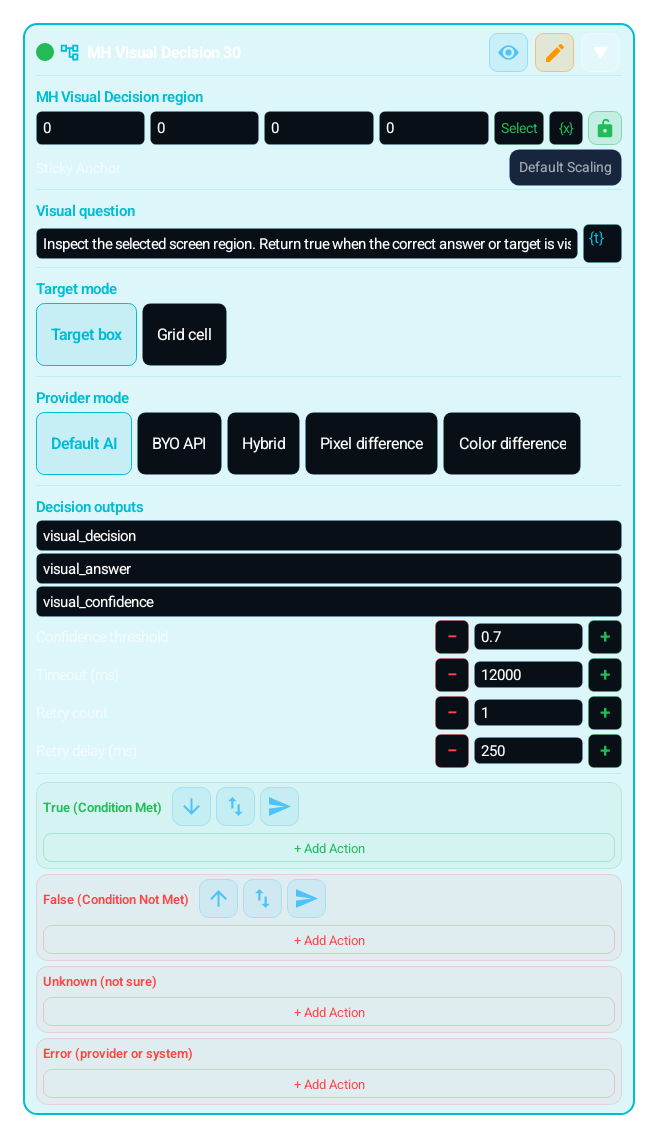
Supports five fail-closed modes: local AI, BYO API, hybrid, pixel difference, and color difference. Difference modes offer a Difference source: “Previous scan” watches temporal change; “Other cells” compares the cells of the same frame against each other and decides on the first scan for static odd-one-out puzzles. AI modes analyse the selected region and normalize output to true, false, unknown, or error. Difference modes make no AI or network call; they compare either the prior frame or cells of the same frame, depending on the selected source.
IMAGE, TEXT, COLOR and the other search blocks that use the Search Regions editor can define several search regions with + Add Region; OCR_VALUE tries its read regions in order. Inside a search region, Exclude Region skips noisy areas such as a HUD or a badge, and it applies only to the search region it belongs to. From 1.0.51 one search region can hold several excluded regions, each with its own shape and its own variable or Dialog binding.Coming soonv1.0.51
You can now assign a sticky anchor to each search region. This brings Region.sticky into the no-code surface so the region can stay aligned to anchors such as top_left, bottom_right, or center when screen geometry changes.
Search Duration (ms) defines one search window; 0 means a single look. Retry Mode in the Retry & Wait section is Off, Infinite Loop, Retry On True, Retry On False, Wait Until Found, or Wait Until Gone, so a block becomes a one-shot check, a controlled polling step, or a step that waits for a target to appear or to disappear. Retry Timeout (ms, 0 = unlimited) bounds the loop; Scan Rate (Hz) sets scans per second.
mScore, scale, and scan engine choices matter across themes, display sizes, and rendering differences. Smaller regions plus the right engine dramatically improve builder stability.
Use when one fixed template is not reliable enough:
Deciding whether a button is visible and ready
Separating success, error, or uncertain screen states
Building fail-safe handling for ads, disconnect prompts, or unexpected screens
Making contextual decisions across different resolutions
Routing true, false, unknown, and error outcomes separately
"Add Block" → "MH Visual Decision (MH_VISUAL_DECISION)"
REGION: Select the narrow screen area that drives the decision
MODE: Choose Local AI, BYO API, Hybrid, Pixel Difference, or Color Difference. Provider credentials come from MH-AI settings; there is no block-level provider-id field
AI MODES: Write a precise prompt and configure confidence, timeout, and retry
DIFFERENCE MODES: Calibrate independent thresholds: normalized RGB from 0.0-1.0 for pixel mode and weighted HSV from 0.0-0.7492157 for colour mode. Previous scan returns unknown while capturing its first baseline; Other cells can decide on the first frame with grid_cell and at least three cells
OUTPUT: Set result, confidence, and optional answer variables
BRANCHES: Wire true, false, unknown, and error separately; use safe recovery on unknown/error
Screen area captured for AI.askVision
Visual decision instruction constrained to true / false / unknown / error
Local AI, BYO API, Hybrid, Pixel Difference, or Color Difference
Temporal comparison with the previous frame or spatial comparison among grid cells of the same frame
Normalized RGB threshold from 0.0-1.0 for pixel mode; weighted HSV threshold from 0.0-0.7492157 for colour mode. Values are stored independently.
Variable such as visual_decision that stores the decision
Variable storing the 0.0-1.0 confidence score
Converts true/false decisions below threshold to unknown
Bounds capture and provider latency safely
Routes uncertainty or failure into safe recovery flows
| Parameter | Description |
|---|---|
| Decision Region | Screen area captured for AI.askVision |
| Prompt | Visual decision instruction constrained to true / false / unknown / error |
| Mode | Local AI, BYO API, Hybrid, Pixel Difference, or Color Difference |
| Difference Source | Temporal comparison with the previous frame or spatial comparison among grid cells of the same frame |
| Difference Threshold | Normalized RGB threshold from 0.0-1.0 for pixel mode; weighted HSV threshold from 0.0-0.7492157 for colour mode. Values are stored independently. |
| Result Variable | Variable such as visual_decision that stores the decision |
| Confidence Variable | Variable storing the 0.0-1.0 confidence score |
| Confidence Threshold | Converts true/false decisions below threshold to unknown |
| Timeout and Retry | Bounds capture and provider latency safely |
| Unknown/Error Branches | Routes uncertainty or failure into safe recovery flows |
Scenario: Keep synchronization when a target button loads late
Add MH_VISUAL_DECISION
Region: area where the button or target panel appears
Prompt: "Return true if the target button is visible and active, false if not visible, unknown if uncertain, error on failure."
Result variable: visual_decision, confidence: visual_confidence
TRUE: CLICK the target
FALSE: WAIT 500 ms and retry in the same state
UNKNOWN: LOG and wait briefly
ERROR: run the recovery group
MOST COMMON COMBINATIONS:
MH_VISUAL_DECISION + CLICK: Click when the visual decision is true
MH_VISUAL_DECISION + WAIT: Stay in the state when false or unknown
MH_VISUAL_DECISION + ERROR_HANDLER: Route provider or capture failures centrally
MH_VISUAL_DECISION + SWITCH_CASE: Branch by visual_decision value
IMAGE + MH_VISUAL_DECISION: narrow with fast template matching, then confirm contextually with AI
Makes visual decisions with local AI, BYO, hybrid, pixel-difference, or color-difference modes
WARNING:
All modes depend on a readable capture source; protected FLAG_SECURE windows cannot be scanned
AI modes also depend on provider access and configured keys; failures route to error
Previous scan returns unknown on its first pass and after region/rotation changes while rebuilding its baseline
Other cells has no baseline; it requires grid_cell and at least three cells, and returns unknown when separation is insufficient
Pixel and colour difference use different scales; do not copy a threshold from one mode to the other
Oversized regions increase latency and can hide small changes; choose the narrowest useful area
Runtime API-key and provider-id overrides are disabled; never put secrets inside a block
The same block at three levels: a quick start, the real options, and professional techniques.
MH_VISUAL_DECISION captures your selected screen region as JPEG, sends your prompt to visual AI (AI.askVision), and normalizes the result to only true, false, unknown or error, writing it into a variable. Use it for visual targets that one template can't reliably catch and for contextual screen decisions.
Provider mode takes five values: local, byo_api, hybrid, pixel_difference, and color_difference. Provider credentials come from MH-AI settings; the block has no provider-id or secret field. The 'Previous scan' source captures a baseline without a hidden delay: the first execution returns unknown, then later loop executions compare 25 stratified samples in every grid cell with the previous frame. The 'Other cells' source needs no baseline; it combines channel-median distance, neighbouring-edge continuity, and colour/texture outlier ranks to find the different image on the first run; this source requires grid_cell and at least three cells. Tied or insufficiently separated top candidates remain unknown; row order or the centre is never used as a fake click target. Confirmation scan count is 1-10: every scan must clear the threshold, one target must win a strict majority, and reported confidence is the winning target's most conservative score. Split votes such as 1-1-1 resolve to unknown, while one negative scan resolves to false. A frame with less than 90 percent valid pixel coverage cannot produce a target. Scan interval (0-10000 ms), post-decision wait (0-10000 ms), timeout, retry count, and retry delay are active in difference modes. Region geometry, rotation, or profile changes invalidate the temporal baseline. pixel_difference measures normalized RGB distance in the 0.0-1.0 range; color_difference measures weighted HSV distance in the 0.0-0.7492157 range. Neither makes an AI/network call. The two thresholds are stored independently, so switching modes restores each mode's calibration. The untouched default is 0.12 for Previous scan and 0.04 for Other cells. Target selection is target_box or grid_cell (1-12 rows/columns, default 3). Wire true, false, unknown, and error separately.
The generated Lua fails closed: only a structured or sufficiently separated decision can trigger true, and the target is published as a noScale screen-space point. Difference modes use ordered bulk sampling instead of one host call per pixel; requests over 1024 points are safely chunked. Temporal confirmation scans compare against the same stored baseline and stop on the first negative pass; spatial scans score every frame independently and require a strict same-target majority. Every decision emits a rate-limited MH_VISUAL_DECISION_TRACE line containing the selected cell, nine scores, runner-up, threshold, region, and scan count without raw pixels or user data. This trace makes wrong-target attribution possible in logcat. Real latency still depends on device/capture performance and the configured scan interval.
Small, reproducible examples that combine several blocks — build them straight into your own macro.
This block is useful on its own — but it shines when paired with the right partners.
When the visual decision is true, CLICK the target; if the model returns target_box you tap the found position.
Narrow first with a fast/cheap IMAGE template, then confirm contextually with MH_VISUAL_DECISION; it blends speed and accuracy.
Route provider or capture failures centrally and tie the error branch to safe recovery.
Cleanly builds four separate flows by the visual_decision value (true/false/unknown/error).
On false or unknown, WAIT inside the state to respect cooldown/load time.
The prompt must request the true/false/unknown/error format; a vague prompt causes a parse error and an unknown result.
An oversized region raises latency and cost and lowers accuracy; choose the narrowest useful region.
A too-high confidence threshold drops valid true/false decisions into the unknown branch; calibrate on the device.
Leaving the unknown/error branches empty; on a provider failure the macro silently goes the wrong way. Put safe recovery on those branches.
Using an AI provider (local/byo_api/hybrid) just for a "did the screen change / did a colour appear" question: that's needless cost, latency and cooldown. For such simple change questions pixel_difference/color_difference is the right, free choice.
Pixel and colour difference do not use the same numeric scale; do not copy a threshold calibrated for one mode into the other. Calibrate each independently with real device samples.
Making the grid_cell grid needlessly large (e.g. 12×12) strains the model and the cell resolution gets finer than you need; 3×3 is usually enough to roughly classify position.
For AI-free decisions (did the screen change, did a color appear) use pixel_difference/color_difference; it is free, instant, and never hits cooldown.
On animated or blinking screens raise confirmation scans (e.g. 3-4) and set a scan interval; only a change that persists through every scan fires the action. Use post-decision wait to let the UI settle before the branches run; the timeout budget caps the whole scan loop and resolves to unknown when exceeded.
If you want to tap a target, choose target_box mode and ask the model for a box; if position-agnostic classification suffices, grid_cell can be simpler.
On rate-limit/timeout errors the block applies exponential cooldown; instead of calling the same block repeatedly in a tight loop, space it with WAIT so cooldown doesn't keep returning unknown.
Practical way to calibrate the confidence threshold: watch the confidence variable on screen with a HUD_OVERLAY/LOG, measure the values that come back on real true and false samples, then set the threshold BETWEEN the two distributions (the point that cuts false positives without dropping valid decisions into unknown).
target_box position is for tapping; if you only care about one decision (present/absent) you can use just the true/false branch in any mode and ignore the box.
The Lua below is what the Code Editor generates for this block with sample settings. Adding cases, branches, actions or loops, or changing settings, extends the generated code accordingly. Study it to see what the block does under the hood, to learn Lua, or to copy and adapt it. Use the Copy button (top-right) to paste it into the Code Editor, or “Try in Editor →” to run it in the live editor.
local visual_decision = nil
local visual_confidence = nil
local visual_answer = nil

visual_decision = "unknown"
visual_confidence = 0
visual_answer = ""
local _visualOk1 = false
local _visualError1 = ""
local _visualNotice1 = ""
local _visualSuppressNotice1 = false
local _visualSkipBranches1 = false
local _visualPrompt1 = tostring("Return true when the target button is visible" or "")
local _visualProvider1 = nil
local _visualRegions1 = {}
_visualRegions1[#_visualRegions1 + 1] = Region():noScale()
local _visualRegionStates1 = {}
local _visualWinner1 = nil
local _visualHardError1 = false
local _visualCurrentRegionIndex1 = nil
local _visualAttempt1 = 0
local _visualMaxAttempts1 = 2
local _visualNowFallback1 = 0
local function _visualNow1()
 local _visualNowOk1, _visualNowValue1 = pcall(function() return System.currentTime() end)
 local _visualNowNumber1 = tonumber(_visualNowValue1)
 if _visualNowOk1 and _visualNowNumber1 ~= nil then
  _visualNowFallback1 = _visualNowNumber1
  return _visualNowFallback1
 end
 _visualNowFallback1 = _visualNowFallback1 + 1000
 return _visualNowFallback1
end
local function _visualSystemLog1(_message)
 pcall(function() System.log(_message) end)
end
local function _visualSystemToast1(_message)
 pcall(function() System.toast(_message) end)
end
local _visualDeadline1 = _visualNow1() + 12000
_MH_VISUAL_AI_COOLDOWN_UNTIL = _MH_VISUAL_AI_COOLDOWN_UNTIL or {}
_MH_VISUAL_AI_BACKOFF_STEP = _MH_VISUAL_AI_BACKOFF_STEP or {}
_MH_VISUAL_AI_COOLDOWN_CODE = _MH_VISUAL_AI_COOLDOWN_CODE or {}
_MH_VISUAL_AI_NOTICE_SHOWN = _MH_VISUAL_AI_NOTICE_SHOWN or {}
local _visualCooldownKey1 = "mh_visual_decision:00000000-0000-4000-8000-000000000001"
local _visualCooldownUntil1 = tonumber(_MH_VISUAL_AI_COOLDOWN_UNTIL[_visualCooldownKey1] or 0) or 0
local _visualMatchRegion1 = nil
local _visualTargetX1 = nil
local _visualTargetY1 = nil
local _visualTargetW1 = nil
local _visualTargetH1 = nil
local _visualTargetCell1 = nil
if _visualNow1() < _visualCooldownUntil1 then
 visual_decision = "error"
 visual_confidence = 0
 _visualHardError1 = true
 _visualNotice1 = "MH_VISUAL_DECISION AI temporarily unavailable"
 _visualSuppressNotice1 = true
else
while _visualAttempt1 < _visualMaxAttempts1 and not _visualOk1 and _visualNow1() < _visualDeadline1 do
 _visualAttempt1 = _visualAttempt1 + 1
 _visualCurrentRegionIndex1 = nil
 if _visualAttempt1 <= #_visualRegions1 then
  _visualCurrentRegionIndex1 = _visualAttempt1
 else
  local _visualFewestAttempts1 = nil
  for _visualCandidateIndex1 = 1, #_visualRegions1 do
   local _visualCandidateState1 = _visualRegionStates1[_visualCandidateIndex1]
   if _visualCandidateState1 ~= nil and (_visualCandidateState1.outcome == "unknown" or _visualCandidateState1.outcome == "error") then
    local _visualCandidateAttempts1 = tonumber(_visualCandidateState1.attempts or 0) or 0
    if _visualFewestAttempts1 == nil or _visualCandidateAttempts1 < _visualFewestAttempts1 then
     _visualFewestAttempts1 = _visualCandidateAttempts1
     _visualCurrentRegionIndex1 = _visualCandidateIndex1
    end
   end
  end
 end
 if _visualCurrentRegionIndex1 == nil then
  _visualOk1 = true
  break
 end
 local _visualCurrentRegion1 = _visualRegions1[_visualCurrentRegionIndex1]
 Snap.screenRefresh()
 local _visualImage1 = ""
 local _visualCaptureOk1 = false
 local _visualCaptureErr1 = ""
 _visualMatchRegion1 = nil
 _visualTargetX1 = nil
 _visualTargetY1 = nil
 _visualTargetW1 = nil
 _visualTargetH1 = nil
 _visualTargetCell1 = nil
 _visualCaptureOk1, _visualCaptureErr1 = pcall(function()
  _visualImage1 = Capture.regionToBase64(_visualCurrentRegion1, "jpeg", 60)
 end)
 if _visualCaptureOk1 and (type(_visualImage1) ~= "string" or _visualImage1 == "") then
  _visualCaptureOk1 = false
  _visualCaptureErr1 = "Screen capture returned no frame."
 end
 if _visualCaptureOk1 and type(_visualImage1) == "string" and _visualImage1 ~= "" then
  _visualMatchRegion1 = _visualCurrentRegion1
 end
 if _visualCaptureOk1 and type(_visualImage1) == "string" and _visualImage1 ~= "" then
  local _visualRemainingMs1 = _visualDeadline1 - _visualNow1()
  if _visualRemainingMs1 >= 1000 then
   _visualRemainingMs1 = math.max(1000, _visualRemainingMs1)
   local _visualUserPrompt1 = "Return a single compact JSON object only with keys decision, confidence, optional answer, and optional target. Do not use markdown fences or prose. decision must be true, false, unknown, or error. confidence must be 0.0-1.0. If the user asks you to read, solve, extract, or describe something, put the usable result in answer as a string. For selection or click-answer tasks, set decision=true when you identify the target. If decision is true and a clickable target is visible, target must be an object with x, y, w, h as NORMALIZED DECIMALS from 0.0 to 1.0 relative to the image you were given (top-left is x=0 y=0; full image width/height is 1.0). Do NOT return encoded-image pixels, a 0-1000 scale, or full-screen coordinates. If the user asks where a color, object, or text is, locate it and return that visible target. If only a point is known, set w=0 and h=0." .. " User prompt: " .. _visualPrompt1
   local _visualCallOk1, _visualResponse1 = pcall(function()
    return AI.askVision(_visualUserPrompt1, _visualImage1, _visualProvider1, "image/jpeg", nil, _visualRemainingMs1)
   end)
   if not _visualCallOk1 then
    local _visualControlSignal1 = string.lower(tostring(_visualResponse1 or ""))
    if string.find(_visualControlSignal1, "compatstopexception", 1, true) or string.find(_visualControlSignal1, "script durduruldu", 1, true) or string.find(_visualControlSignal1, "budget_", 1, true) then
     error(_visualResponse1, 0)
    end
   end
   if not _visualCallOk1 then
    _visualResponse1 = { ok = false, error = tostring(_visualResponse1 or "AI vision request failed.") }
   end
   if type(_visualResponse1) == "table" and _visualResponse1.ok == true then
    local _visualReplyRaw1 = tostring(_visualResponse1.text or "")
    local _visualReplyLower1 = string.lower(_visualReplyRaw1)
    local _visualReplyJsonRaw1 = string.match(_visualReplyRaw1, "%b{}") or _visualReplyRaw1
    local _visualReplyJson1 = string.match(_visualReplyLower1, "%b{}") or _visualReplyLower1
    local _visualAnswerText1 = string.match(_visualReplyJsonRaw1, "\"answer\"%s*:%s*\"(.-)\"")
    if _visualAnswerText1 == nil or _visualAnswerText1 == "" then
     _visualAnswerText1 = _visualReplyRaw1
    end
    visual_answer = _visualAnswerText1
    local _visualDecisionString1 = string.match(_visualReplyJson1, "\"decision\"%s*:%s*\"([a-z_]+)\"")
    local _visualDecisionRaw1 = string.match(_visualReplyJson1, "\"decision\"%s*:%s*([a-z_]+)")
    local _visualDecision1 = nil
    if _visualDecisionRaw1 == "true" or _visualDecisionRaw1 == "false" or _visualDecisionRaw1 == "unknown" or _visualDecisionRaw1 == "error" then
     _visualDecision1 = _visualDecisionRaw1
    elseif _visualDecisionString1 == "true" or _visualDecisionString1 == "false" or _visualDecisionString1 == "unknown" or _visualDecisionString1 == "error" then
     _visualDecision1 = _visualDecisionString1
    end
    local _visualConfidenceText1 = string.match(_visualReplyJson1, "\"confidence\"%s*:%s*([0-9%.]+)") or string.match(_visualReplyJson1, "\"confidence\"%s*:%s*\"([0-9%.]+)\"")
    local function _visualNumberValue1(_block, _key)
     if _block == nil then return nil end
     return tonumber(string.match(_block, "\"" .. _key .. "\"%s*:%s*(%-?[0-9%.]+)")) or tonumber(string.match(_block, "\"" .. _key .. "\"%s*:%s*\"(%-?[0-9%.]+)\""))
    end
    local function _visualFirstNumber1(_block, _keys)
     if _block == nil then return nil end
     for _, _key in ipairs(_keys) do
      local _value = _visualNumberValue1(_block, _key)
      if _value ~= nil then return _value end
     end
     return nil
    end
    local _visualTargetBlock1 = string.match(_visualReplyJson1, "\"target\"%s*:%s*%{([^}]*)%}")
     or string.match(_visualReplyJson1, "\"target_box\"%s*:%s*%{([^}]*)%}")
     or string.match(_visualReplyJson1, "\"targetbox\"%s*:%s*%{([^}]*)%}")
     or string.match(_visualReplyJson1, "\"bbox\"%s*:%s*%{([^}]*)%}")
     or string.match(_visualReplyJson1, "\"box\"%s*:%s*%{([^}]*)%}")
     or string.match(_visualReplyJson1, "\"bounding_box\"%s*:%s*%{([^}]*)%}")
     or string.match(_visualReplyJson1, "\"rect\"%s*:%s*%{([^}]*)%}")
     or string.match(_visualReplyJson1, "\"rectangle\"%s*:%s*%{([^}]*)%}")
     or string.match(_visualReplyJson1, "\"point\"%s*:%s*%{([^}]*)%}")
    if _visualTargetBlock1 ~= nil then
     _visualTargetX1 = _visualFirstNumber1(_visualTargetBlock1, { "x", "left", "l", "x1", "min_x", "xmin" })
     _visualTargetY1 = _visualFirstNumber1(_visualTargetBlock1, { "y", "top", "t", "y1", "min_y", "ymin" })
     _visualTargetW1 = _visualFirstNumber1(_visualTargetBlock1, { "w", "width" })
     _visualTargetH1 = _visualFirstNumber1(_visualTargetBlock1, { "h", "height" })
     local _visualTargetRight1 = _visualFirstNumber1(_visualTargetBlock1, { "right", "x2", "max_x", "maxx" })
     local _visualTargetBottom1 = _visualFirstNumber1(_visualTargetBlock1, { "bottom", "y2", "max_y", "maxy" })
     local _visualTargetCenterX1 = _visualFirstNumber1(_visualTargetBlock1, { "center_x", "centerx", "cx" })
     local _visualTargetCenterY1 = _visualFirstNumber1(_visualTargetBlock1, { "center_y", "centery", "cy" })
     if (_visualTargetX1 == nil or _visualTargetY1 == nil) and _visualTargetCenterX1 ~= nil and _visualTargetCenterY1 ~= nil then
      _visualTargetX1 = _visualTargetCenterX1
      _visualTargetY1 = _visualTargetCenterY1
      _visualTargetW1 = _visualTargetW1 or 0
      _visualTargetH1 = _visualTargetH1 or 0
     end
     if _visualTargetW1 == nil and _visualTargetRight1 ~= nil and _visualTargetX1 ~= nil then
      _visualTargetW1 = _visualTargetRight1 - _visualTargetX1
     end
     if _visualTargetH1 == nil and _visualTargetBottom1 ~= nil and _visualTargetY1 ~= nil then
      _visualTargetH1 = _visualTargetBottom1 - _visualTargetY1
     end
    end
    if _visualTargetX1 == nil or _visualTargetY1 == nil then
     local _visualTargetArray1 = string.match(_visualReplyJson1, "\"target\"%s*:%s*%[([^%]]*)%]")
      or string.match(_visualReplyJson1, "\"target_box\"%s*:%s*%[([^%]]*)%]")
      or string.match(_visualReplyJson1, "\"targetbox\"%s*:%s*%[([^%]]*)%]")
      or string.match(_visualReplyJson1, "\"bbox\"%s*:%s*%[([^%]]*)%]")
      or string.match(_visualReplyJson1, "\"box\"%s*:%s*%[([^%]]*)%]")
      or string.match(_visualReplyJson1, "\"point\"%s*:%s*%[([^%]]*)%]")
     if _visualTargetArray1 ~= nil then
      local _visualTargetValues1 = {}
      for _visualTargetNumberText1 in string.gmatch(_visualTargetArray1, "%-?[0-9]+%.?[0-9]*") do
       _visualTargetValues1[#_visualTargetValues1 + 1] = tonumber(_visualTargetNumberText1)
      end
      if _visualTargetValues1[1] ~= nil and _visualTargetValues1[2] ~= nil then
       _visualTargetX1 = _visualTargetValues1[1]
       _visualTargetY1 = _visualTargetValues1[2]
       local _visualTargetThird1 = _visualTargetValues1[3]
       local _visualTargetFourth1 = _visualTargetValues1[4]
       local _visualArrayLooksNormalizedXyxy1 = _visualTargetThird1 ~= nil and _visualTargetFourth1 ~= nil
        and _visualTargetValues1[1] >= 0 and _visualTargetValues1[1] <= 1
        and _visualTargetValues1[2] >= 0 and _visualTargetValues1[2] <= 1
        and _visualTargetThird1 >= 0 and _visualTargetThird1 <= 1
        and _visualTargetFourth1 >= 0 and _visualTargetFourth1 <= 1
        and _visualTargetThird1 > _visualTargetValues1[1]
        and _visualTargetFourth1 > _visualTargetValues1[2]
       if _visualArrayLooksNormalizedXyxy1 then
        _visualTargetW1 = _visualTargetThird1 - _visualTargetValues1[1]
        _visualTargetH1 = _visualTargetFourth1 - _visualTargetValues1[2]
       else
        _visualTargetW1 = _visualTargetThird1 or 0
        _visualTargetH1 = _visualTargetFourth1 or 0
       end
      end
     end
    end
    if (_visualTargetX1 == nil or _visualTargetY1 == nil) and _visualMatchRegion1 ~= nil then
     local _visualDirectionText1 = string.lower(tostring(_visualAnswerText1 or ""))
     local function _visualHasAny1(_text, _words)
      for _, _word in ipairs(_words) do
       if string.find(_text, _word, 1, true) then return true end
      end
      return false
     end
     local _visualDirLeft1 = _visualHasAny1(_visualDirectionText1, { "left", "sol" })
     local _visualDirRight1 = _visualHasAny1(_visualDirectionText1, { "right", "sag" })
     local _visualDirTop1 = _visualHasAny1(_visualDirectionText1, { "top", "upper", "ust", "yukari" })
     local _visualDirBottom1 = _visualHasAny1(_visualDirectionText1, { "bottom", "lower", "alt", "asagi" })
     local _visualDirCenter1 = _visualHasAny1(_visualDirectionText1, { "center", "middle", "orta", "merkez" })
     if _visualDirLeft1 or _visualDirRight1 or _visualDirTop1 or _visualDirBottom1 or _visualDirCenter1 then
      local _visualRegionWForDirection1 = math.max(0, _visualMatchRegion1:getW())
      local _visualRegionHForDirection1 = math.max(0, _visualMatchRegion1:getH())
      if _visualRegionWForDirection1 > 0 and _visualRegionHForDirection1 > 0 then
       local _visualFx1 = 0.5
       local _visualFy1 = 0.5
       if _visualDirLeft1 then _visualFx1 = 0.25 elseif _visualDirRight1 then _visualFx1 = 0.75 end
       if _visualDirTop1 then _visualFy1 = 0.25 elseif _visualDirBottom1 then _visualFy1 = 0.75 end
       _visualTargetX1 = _visualRegionWForDirection1 * _visualFx1
       _visualTargetY1 = _visualRegionHForDirection1 * _visualFy1
       _visualTargetW1 = 0
       _visualTargetH1 = 0
      end
     end
    end
    if _visualTargetX1 ~= nil and _visualTargetY1 ~= nil and _visualMatchRegion1 ~= nil then
     local _visualTargetRegionW1 = math.max(0, _visualMatchRegion1:getW())
     local _visualTargetRegionH1 = math.max(0, _visualMatchRegion1:getH())
     local _visualTargetWForScale1 = _visualTargetW1 or 0
     local _visualTargetHForScale1 = _visualTargetH1 or 0
     local _visualTargetLooksNormalized1 = _visualTargetRegionW1 > 1 and _visualTargetRegionH1 > 1
      and _visualTargetX1 >= 0 and _visualTargetX1 <= 1
      and _visualTargetY1 >= 0 and _visualTargetY1 <= 1
      and _visualTargetWForScale1 >= 0 and _visualTargetWForScale1 <= 1
      and _visualTargetHForScale1 >= 0 and _visualTargetHForScale1 <= 1
     if _visualTargetLooksNormalized1 then
      _visualTargetX1 = _visualTargetX1 * _visualTargetRegionW1
      _visualTargetY1 = _visualTargetY1 * _visualTargetRegionH1
      _visualTargetW1 = _visualTargetWForScale1 * _visualTargetRegionW1
      _visualTargetH1 = _visualTargetHForScale1 * _visualTargetRegionH1
     end
    end
    if _visualTargetX1 ~= nil and _visualTargetY1 ~= nil and _visualMatchRegion1 ~= nil then
     local _visualAbsoluteOriginX1 = _visualMatchRegion1:getX()
     local _visualAbsoluteOriginY1 = _visualMatchRegion1:getY()
     local _visualAbsoluteRegionW1 = math.max(0, _visualMatchRegion1:getW())
     local _visualAbsoluteRegionH1 = math.max(0, _visualMatchRegion1:getH())
     local _visualTargetWForAbsolute1 = _visualTargetW1 or 0
     local _visualTargetHForAbsolute1 = _visualTargetH1 or 0
     local _visualTargetAlreadyRelative1 = _visualAbsoluteRegionW1 > 0 and _visualAbsoluteRegionH1 > 0
      and _visualTargetX1 >= 0
      and _visualTargetY1 >= 0
      and _visualTargetWForAbsolute1 >= 0
      and _visualTargetHForAbsolute1 >= 0
      and (_visualTargetX1 + _visualTargetWForAbsolute1) <= _visualAbsoluteRegionW1
      and (_visualTargetY1 + _visualTargetHForAbsolute1) <= _visualAbsoluteRegionH1
     local _visualTargetLooksAbsolute1 = not _visualTargetAlreadyRelative1
      and _visualAbsoluteRegionW1 > 0 and _visualAbsoluteRegionH1 > 0
      and _visualTargetX1 >= _visualAbsoluteOriginX1
      and _visualTargetY1 >= _visualAbsoluteOriginY1
      and (_visualTargetX1 + _visualTargetWForAbsolute1) <= (_visualAbsoluteOriginX1 + _visualAbsoluteRegionW1)
      and (_visualTargetY1 + _visualTargetHForAbsolute1) <= (_visualAbsoluteOriginY1 + _visualAbsoluteRegionH1)
     if _visualTargetLooksAbsolute1 then
      _visualTargetX1 = _visualTargetX1 - _visualAbsoluteOriginX1
      _visualTargetY1 = _visualTargetY1 - _visualAbsoluteOriginY1
     end
    end
    if _visualTargetX1 ~= nil and _visualTargetY1 ~= nil and _visualMatchRegion1 ~= nil then
     local _visualScaleRegionW1 = math.max(0, _visualMatchRegion1:getW())
     local _visualScaleRegionH1 = math.max(0, _visualMatchRegion1:getH())
     local _visualScaleW1 = _visualTargetW1 or 0
     local _visualScaleH1 = _visualTargetH1 or 0
     if _visualScaleRegionW1 > 0 and _visualScaleRegionH1 > 0 and _visualScaleRegionW1 <= 1000 and _visualScaleRegionH1 <= 1000 then
      local _visualScaleOverflow1 = _visualTargetX1 > (_visualScaleRegionW1 * 1.25) or _visualTargetY1 > (_visualScaleRegionH1 * 1.25)
      local _visualScaleFits1 = _visualTargetX1 >= 0 and _visualTargetX1 <= 1000 and _visualTargetY1 >= 0 and _visualTargetY1 <= 1000 and _visualScaleW1 >= 0 and _visualScaleW1 <= 1000 and _visualScaleH1 >= 0 and _visualScaleH1 <= 1000
      if _visualScaleOverflow1 and _visualScaleFits1 then
       _visualTargetX1 = (_visualTargetX1 / 1000.0) * _visualScaleRegionW1
       _visualTargetY1 = (_visualTargetY1 / 1000.0) * _visualScaleRegionH1
       _visualTargetW1 = (_visualScaleW1 / 1000.0) * _visualScaleRegionW1
       _visualTargetH1 = (_visualScaleH1 / 1000.0) * _visualScaleRegionH1
      end
     end
    end
    local _visualHasTarget1 = _visualTargetX1 ~= nil and _visualTargetY1 ~= nil
    visual_confidence = math.max(0, math.min(1, tonumber(_visualConfidenceText1) or 0))
    if _visualDecision1 == nil and _visualHasTarget1 then
     _visualDecision1 = "true"
     if visual_confidence <= 0 then
      visual_confidence = 1
     end
    end
    if _visualDecision1 == "true" or _visualDecision1 == "false" then
     if visual_confidence < 0.7 then
      visual_decision = "unknown"
     else
      visual_decision = _visualDecision1
     end
    elseif _visualDecision1 == "unknown" then
     visual_decision = "unknown"
    elseif _visualDecision1 == "error" then
     visual_decision = "error"
    else
     visual_decision = "unknown"
     visual_confidence = 0
     _visualError1 = "Unstructured visual decision response."
     _visualNotice1 = "MH_VISUAL_DECISION unstructured response"
     _visualSystemLog1("MH_VISUAL_DECISION unstructured response")
    end
    _MH_VISUAL_AI_BACKOFF_STEP[_visualCooldownKey1] = 0
    _MH_VISUAL_AI_COOLDOWN_UNTIL[_visualCooldownKey1] = 0
    _MH_VISUAL_AI_COOLDOWN_CODE[_visualCooldownKey1] = nil
   else
    _visualError1 = type(_visualResponse1) == "table" and tostring(_visualResponse1.error or "") or "AI vision request failed."
    local _visualErrorCode1 = type(_visualResponse1) == "table" and tostring(_visualResponse1.errorCode or "") or ""
    if _visualErrorCode1 == "" or _visualErrorCode1 == "unknown" then
     local _visualErrorLower1 = string.lower(tostring(_visualError1 or ""))
     if string.find(_visualErrorLower1, "api key is missing", 1, true) or string.find(_visualErrorLower1, "api anahtari eksik", 1, true) or string.find(_visualErrorLower1, "block api key is missing", 1, true) then
      _visualErrorCode1 = "api_key_missing"
     elseif string.find(_visualErrorLower1, "api key was rejected", 1, true) or string.find(_visualErrorLower1, "api key not valid", 1, true) or string.find(_visualErrorLower1, "invalid api key", 1, true) or string.find(_visualErrorLower1, "api_key_invalid", 1, true) or string.find(_visualErrorLower1, "permission denied", 1, true) or string.find(_visualErrorLower1, "unauthorized", 1, true) or string.find(_visualErrorLower1, "401", 1, true) or string.find(_visualErrorLower1, "403", 1, true) or string.find(_visualErrorLower1, "anahtari reddedildi", 1, true) then
      _visualErrorCode1 = "api_key_invalid"
     elseif string.find(_visualErrorLower1, "rate limit", 1, true) or string.find(_visualErrorLower1, "quota", 1, true) or string.find(_visualErrorLower1, "kota", 1, true) or string.find(_visualErrorLower1, "429", 1, true) then
      _visualErrorCode1 = "rate_limited"
     elseif string.find(_visualErrorLower1, "timed out", 1, true) or string.find(_visualErrorLower1, "timeout", 1, true) or string.find(_visualErrorLower1, "time out", 1, true) or string.find(_visualErrorLower1, "zaman asimi", 1, true) or string.find(_visualErrorLower1, "zaman as", 1, true) then
      _visualErrorCode1 = "timeout"
     elseif string.find(_visualErrorLower1, "connection", 1, true) or string.find(_visualErrorLower1, "network", 1, true) or string.find(_visualErrorLower1, "internet", 1, true) or string.find(_visualErrorLower1, "unknown host", 1, true) or string.find(_visualErrorLower1, "temporarily unavailable", 1, true) or string.find(_visualErrorLower1, "service is temporarily", 1, true) or string.find(_visualErrorLower1, "baglanti", 1, true) or string.find(_visualErrorLower1, "408", 1, true) or string.find(_visualErrorLower1, "502", 1, true) or string.find(_visualErrorLower1, "503", 1, true) or string.find(_visualErrorLower1, "504", 1, true) then
      _visualErrorCode1 = "network"
     elseif string.find(_visualErrorLower1, "stopped", 1, true) or string.find(_visualErrorLower1, "durdur", 1, true) then
      _visualErrorCode1 = "stopped"
     end
    end
    visual_decision = "error"
    visual_confidence = 0
    _visualNotice1 = "MH_VISUAL_DECISION AI request failed"
    if _visualErrorCode1 == "api_key_missing" or _visualErrorCode1 == "api_key_invalid" then
     _visualNotice1 = "MH_VISUAL_DECISION API key needs attention"
     _visualSystemLog1("MH_VISUAL_DECISION failed")
     _visualHardError1 = true
     break
    end
    if _visualErrorCode1 == "quota_exhausted" then
     _visualNotice1 = "MH_VISUAL_DECISION API quota is exhausted"
     _visualSystemLog1("MH_VISUAL_DECISION failed")
     _MH_VISUAL_AI_BACKOFF_STEP[_visualCooldownKey1] = 0
     _MH_VISUAL_AI_COOLDOWN_UNTIL[_visualCooldownKey1] = _visualNow1() + 21600000
     _MH_VISUAL_AI_COOLDOWN_CODE[_visualCooldownKey1] = "quota_exhausted"
     _visualHardError1 = true
     break
    end
    if string.find(_visualErrorCode1, "visual_credential_", 1, true) == 1 then
     _visualNotice1 = "MH_VISUAL_DECISION API provider/key binding needs attention"
     _visualSystemLog1("MH_VISUAL_DECISION failed")
     _visualHardError1 = true
     break
    end
    local _visualRetryableAi1 = _visualErrorCode1 == "rate_limited" or _visualErrorCode1 == "network" or _visualErrorCode1 == "timeout"
    if _visualRetryableAi1 then
     local _visualBackoffStep1 = math.min((tonumber(_MH_VISUAL_AI_BACKOFF_STEP[_visualCooldownKey1] or 0) or 0) + 1, 4)
     _MH_VISUAL_AI_BACKOFF_STEP[_visualCooldownKey1] = _visualBackoffStep1
     local _visualBackoffBaseMs1 = _visualErrorCode1 == "rate_limited" and 60000 or 10000
     local _visualCooldownMs1 = math.min(120000, _visualBackoffBaseMs1 * (2 ^ (_visualBackoffStep1 - 1)))
     _MH_VISUAL_AI_COOLDOWN_UNTIL[_visualCooldownKey1] = _visualNow1() + _visualCooldownMs1
     _MH_VISUAL_AI_COOLDOWN_CODE[_visualCooldownKey1] = _visualErrorCode1
     if _visualErrorCode1 == "rate_limited" then
      visual_decision = "error"
      visual_confidence = 0
      _visualNotice1 = "MH_VISUAL_DECISION AI rate limit reached"
     else
      _visualNotice1 = "MH_VISUAL_DECISION waiting for AI connection"
      _visualSystemLog1("MH_VISUAL_DECISION failed")
     end
     _visualHardError1 = true
     break
    end
    _visualSystemLog1("MH_VISUAL_DECISION failed")
   end
  else
   _visualError1 = "Visual decision timeout budget exhausted."
   visual_decision = "unknown"
   visual_confidence = 0
   _visualNotice1 = "MH_VISUAL_DECISION timeout"
  end
 else
  _visualError1 = tostring(_visualCaptureErr1 or "Screen capture failed.")
  local _visualCaptureErrorLower1 = string.lower(tostring(_visualError1 or ""))
  visual_decision = "error"
  visual_confidence = 0
  _visualNotice1 = "MH_VISUAL_DECISION capture failed"
  if string.find(_visualCaptureErrorLower1, "service is not connected", 1, true) or string.find(_visualCaptureErrorLower1, "permission", 1, true) or string.find(_visualCaptureErrorLower1, "izin", 1, true) then
   _visualNotice1 = "MH_VISUAL_DECISION capture needs screen capture permission"
  elseif string.find(_visualCaptureErrorLower1, "no frame", 1, true) or string.find(_visualCaptureErrorLower1, "returned no frame", 1, true) or string.find(_visualCaptureErrorLower1, "source frame is invalid", 1, true) then
   _visualNotice1 = "MH_VISUAL_DECISION capture returned no screen frame"
  elseif string.find(_visualCaptureErrorLower1, "outside the screen", 1, true) or string.find(_visualCaptureErrorLower1, "outside the captured frame", 1, true) or string.find(_visualCaptureErrorLower1, "requires a region", 1, true) or string.find(_visualCaptureErrorLower1, "region.", 1, true) then
   _visualNotice1 = "MH_VISUAL_DECISION capture region is invalid"
  end
  _visualSystemLog1("MH_VISUAL_DECISION capture failed")
 end
 local _visualPreviousRegionState1 = _visualRegionStates1[_visualCurrentRegionIndex1]
 local _visualRegionState1 = {
  outcome = visual_decision,
  confidence = visual_confidence,
  answer = visual_answer,
  region = _visualCurrentRegion1,
  targetX = _visualTargetX1,
  targetY = _visualTargetY1,
  targetW = _visualTargetW1,
  targetH = _visualTargetH1,
  targetCell = _visualTargetCell1,
  attempts = ((_visualPreviousRegionState1 ~= nil and tonumber(_visualPreviousRegionState1.attempts)) or 0) + 1,
 }
 _visualRegionStates1[_visualCurrentRegionIndex1] = _visualRegionState1
 if visual_decision == "true" and visual_confidence >= 0.7 then
  _visualWinner1 = _visualRegionState1
  _visualOk1 = true
  _visualNotice1 = ""
  _visualSuppressNotice1 = false
 elseif visual_decision == "false" then
  local _visualAllFalse1 = #_visualRegions1 > 0
  for _visualResolvedIndex1 = 1, #_visualRegions1 do
   local _visualResolvedState1 = _visualRegionStates1[_visualResolvedIndex1]
   if _visualResolvedState1 == nil or _visualResolvedState1.outcome ~= "false" then
    _visualAllFalse1 = false
    break
   end
  end
  if _visualAllFalse1 then _visualOk1 = true end
 end
 if not _visualOk1 and _visualAttempt1 < _visualMaxAttempts1 and _visualNow1() < _visualDeadline1 then
  local _visualDelayBudget1 = math.max(0, _visualDeadline1 - _visualNow1())
  wait(math.min(250, _visualDelayBudget1))
 end
end
end
if _visualWinner1 ~= nil then
 visual_confidence = tonumber(_visualWinner1.confidence) or 0
 visual_answer = tostring(_visualWinner1.answer or "")
 _visualMatchRegion1 = _visualWinner1.region
 _visualTargetX1 = _visualWinner1.targetX
 _visualTargetY1 = _visualWinner1.targetY
 _visualTargetW1 = _visualWinner1.targetW
 _visualTargetH1 = _visualWinner1.targetH
 _visualTargetCell1 = _visualWinner1.targetCell
elseif _visualHardError1 then
 visual_decision = "error"
 visual_confidence = 0
 visual_answer = ""
 _visualMatchRegion1 = nil
else
 local _visualAggregateHasError1 = false
 local _visualAggregateHasUnknown1 = false
 local _visualAggregateAllFalse1 = #_visualRegions1 > 0
 local _visualAggregateIncomplete1 = false
 local _visualAggregateFalseConfidence1 = 1
 for _visualAggregateIndex1 = 1, #_visualRegions1 do
  local _visualAggregateState1 = _visualRegionStates1[_visualAggregateIndex1]
  if _visualAggregateState1 == nil then
   _visualAggregateIncomplete1 = true
   _visualAggregateHasUnknown1 = true
   _visualAggregateAllFalse1 = false
  elseif _visualAggregateState1.outcome == "error" then
   _visualAggregateHasError1 = true
   _visualAggregateAllFalse1 = false
  elseif _visualAggregateState1.outcome == "unknown" then
   _visualAggregateHasUnknown1 = true
   _visualAggregateAllFalse1 = false
  elseif _visualAggregateState1.outcome == "false" then
   _visualAggregateFalseConfidence1 = math.min(_visualAggregateFalseConfidence1, tonumber(_visualAggregateState1.confidence) or 0)
  else
   _visualAggregateHasUnknown1 = true
   _visualAggregateAllFalse1 = false
  end
 end
 _visualMatchRegion1 = nil
 _visualTargetX1 = nil
 _visualTargetY1 = nil
 _visualTargetW1 = nil
 _visualTargetH1 = nil
 _visualTargetCell1 = nil
 if _visualAggregateHasError1 then
  visual_decision = "error"
  visual_confidence = 0
  visual_answer = ""
 elseif _visualAggregateHasUnknown1 then
  visual_decision = "unknown"
  visual_confidence = 0
  visual_answer = ""
  if _visualAggregateIncomplete1 then
   if _visualNow1() >= _visualDeadline1 then
    _visualNotice1 = "MH_VISUAL_DECISION timeout"
   else
    _visualNotice1 = "MH_VISUAL_DECISION region evaluation budget exhausted"
   end
  end
 elseif _visualAggregateAllFalse1 then
  visual_decision = "false"
  visual_confidence = _visualAggregateFalseConfidence1
  if #_visualRegions1 > 1 then visual_answer = "" end
  _visualOk1 = true
 else
  visual_decision = "unknown"
  visual_confidence = 0
  visual_answer = ""
 end
end
if Snap.clear then Snap.clear() end
if not _visualOk1 and not _visualSuppressNotice1 then
 if visual_decision ~= "unknown" and visual_decision ~= "error" then
  visual_decision = "error"
 end
 visual_confidence = 0
 if _visualNotice1 == "" then
  if visual_decision == "unknown" then
   _visualNotice1 = "MH_VISUAL_DECISION unresolved"
  else
   _visualNotice1 = "MH_VISUAL_DECISION failed"
  end
 end
end
if _visualNotice1 ~= "" and not _visualSuppressNotice1 then
 local _visualNoticeKey1 = _visualCooldownKey1 .. ":" .. _visualNotice1
 if _MH_VISUAL_AI_NOTICE_SHOWN[_visualNoticeKey1] ~= true then
  _MH_VISUAL_AI_NOTICE_SHOWN[_visualNoticeKey1] = true
  _visualSystemToast1(_visualNotice1)
 end
end
Note: generated code can evolve across versions; helper names (e.g. _reg1, m1) and internal optimizations may change. The logic and the called APIs reflect the block’s behavior.
The guidance below is not identical for every block. It summarizes the professional controls that most often repeat in the selected block family.
Keep the search close to the target. Smaller regions are faster and more stable.
Exclude static noise, badges, animations, or reflective areas to reduce false matches.
Timeout and scan rate define whether the block acts as a single check or controlled polling step.
mScore, scale, and engine choice must be tuned together for theme, resolution, and rendering differences.
OCR_VALUE writes the number it reads to its result variable (default ocr_val); TEXT writes the text it passed through its find/replace step to the Save Read Value variable (default ocr_val). In Match Variables, the score variable (0.0–1.0 confidence) and the X/Y/W/H variables carry the match confidence and position into later blocks: branch on the score with COMPARE, and in CLICK bind the coordinates to them with {x} or turn on Click on match. _lastMatch is the last match that Click on match uses; _lastOcrText is kept only for older CUSTOM_CODE scripts.
TOUCH and TOUCH_BREAK cover recipe-style touch flows. Raw pointer choreography such as Touch.down, Touch.move, Touch.up, Touch.dispatch, Touch.reset, Touch.breakAll, and Touch.releaseAfter is not exposed as a first-class builder block.
Touch.downTouch.moveTouch.upTouch.dispatchTouch.resetTouch.breakAllTouch.releaseAfterThe DIALOG block and dialog designer cover a bounded field set in the builder: Info Text, Text Input, Checkbox, Description, Radio Group, Dropdown, Multi Select, Tab Group, Date Time, Number Range, Slider, Image Picker, Color Picker, File Picker, Recorder Picker, Tag, Signature, and Spacer. The buttons are designed too: the Positive button and Negative button tabs set each button’s text, background, and border color, corner radius, and minimum height next to a preview. Freer Setting.builder composition, multi-step wizard flows, and mixed HUD/dialog choreography still do not map 1:1 into the builder.
Coming soonv1.0.51Two more fields: Agent Detect references (agent_detect_editor) lets the user pick a saved reference set or add and edit references, and Save confirms the selection; Navigation setup editor (navigation_editor) edits a saved map, marker and route from the Dialog and returns the setup and route selection without moving the character.
Setting.builderDialogHudTextViewAgentDetectEditorNavigationEditorHTTP_GET, HTTP_POST, and HTTP_PUT cover common fixed-method flows; HTTP_REQUEST covers one bounded request with method, header lines, body, content type, query parameters (GET and DELETE), timeout, and a bounded retry. These blocks never throw; they write the status code (-1 on a network failure). Cookie handling, chained request objects, and lower-level client flows still need the code editor.
Request()Request.setCookieRequest.getCookiesCUSTOM_CODEThe MAP, LIST, JSON_PARSE, REGEX_MATCH, and METRICS blocks cover the everyday cases: map actions, a static list, reading a value from a JSON path, regex match, find, replace, and split, and metrics actions. The rest of the Map, Array, JSON, Regex, and Metrics APIs (for example Array sort, filter, and map) is broader than the builder recipe model and stays on the CUSTOM_CODE and code editor side.
MapArrayJSONRegexMetricsRuntime helpers, raw Request objects, Lua built-ins such as print/pcall/xpcall, and free-form object chaining patterns are represented through CUSTOM_CODE or the code editor.
RuntimeRequestprintpcallxpcallCUSTOM_CODEEach block card now exposes an independent breakpoint toggle. When enabled, the breakpoint preference is stored with the block.
Breakpoints are only emitted into runtime code when Debug Mode is enabled from Visual Builder settings. When Debug Mode is off, breakpoints stay saved but do not pause execution.
Use ASSERT for fail-fast validation, and use breakpoints for step-by-step tracing and controlled pauses in the same flow.
Variables defined with SET_VARIABLE are accessible throughout the macro (global scope). All blocks can read/write the same variable.
However, a variable defined inside a GROUP will be 'nil' (undefined) until the GROUP executes. Blocks outside the GROUP using this variable may produce unexpected results.
FOR_EACH loop variables (item and index) only carry valid values inside the loop body. Outside the loop they are outside local scope and should not be used.
TRY_CATCH error variable is only valid within the catch block. If the try block succeeds, the catch branch is not entered and the error variable remains undefined.
TIP: Before using a variable inside a GROUP, assign a default value with SET_VARIABLE outside the GROUP. This way the variable won't be nil even if the GROUP has not run.
You can embed variable values and calculations into text fields using {{ expression }} syntax. Expressions inside double curly braces are evaluated as Lua code and the result is inserted into the text.
{{ expression }}Skor: {{ score + 1 }} → "Skor: " .. tostring(score + 1){{ name }} kazandı! → tostring(name) .. " kazandı!"X:{{ x }} Y:{{ y }} → "X:" .. tostring(x) .. " Y:" .. tostring(y)Expressions are checked by the sandbox policy. Security-sensitive calls like loadstring, require, debug are automatically blocked.
Keep scan regions as small as possible — improves speed, reduces false matches.
Always add an exit condition when using infinite loops (BREAK, timeout, or conditional exit).
Use network operations and error-prone steps inside TRY_CATCH.
If you need global error handling, use the Error Handler (ERROR_HANDLER) block as a singleton in the project.
Small coordinate offsets (CLICK/SWIPE) improve tap accuracy across different DPI and screen scales.
Customize macros with Dialog block — different parameters each run.
Define repeating steps once with GROUP_CALL, call from many places.
Cross-macro local library
The Local Shared Macro Area moves blocks, variables, dialog fields, gallery assets, and imported media dependencies between macros on the same device. It is device-local, not cloud sync, not Firebase sharing, and not a replacement for public macro sharing.
Professional usage model: put a reusable login flow, common scan region, shared dialog form, variable group, template image, color profile, replay recording, or imported PLAY_SOUND media file into the shared area from one macro, then import it from the relevant + menu in another macro.
VISUAL_BLOCKSVARIABLESDIALOG_FIELDSTEMPLATE_IMAGECOLOR_SWATCHREPLAY_RECORDMEDIA_FILEWhen one item or a multi-selection is active, the shared-area button can copy the selected part from the workspace, group, true/false action branch, dialog, and variables surfaces into the device-local library.
The shared-area entry under the + menu imports the selected item into the surface that opened it. Main workspace, group, action branch, dialog, and variables each receive the compatible item type.
Gallery items include template images, color swatches, replay records, and imported audio/media files. They can move between macros on the same device so repeated templates, colors, recordings, and PLAY_SOUND media assets do not need to be captured again.
The shared area is not a permanent dumping ground. Delete stale shared items from the shared-library panel; imports create a copy in the target macro and do not rewrite the source macro flow.
AI assistant
Tell MH AI what you want in plain language; it proposes the right block sequence and lands it in the workspace after you approve. In the current release it works with cloud providers such as Gemini, Claude, and OpenAI; on-device local models are on the roadmap.