
1
Send to the shared area
When one item or a multi-selection is active, the shared-area button can copy the selected part from the workspace, group, true/false action branch, dialog, and variables surfaces into the device-local library.
No-Code Workspace — Block Reference
Searches for text on screen (OCR)
Documented for app version 1.0.50Updated:
Block Preview
Captured from the in-app Visual Builder block card in the English UI.
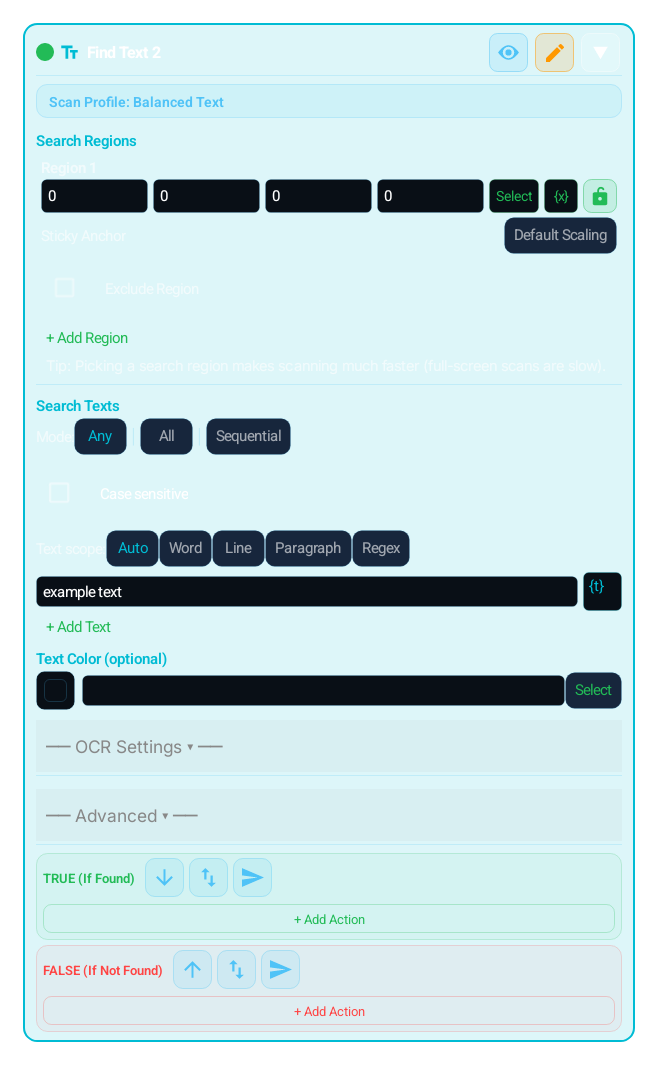
Block Preview
Captured from the English Visual Builder block card with the Advanced/extra settings panel expanded.
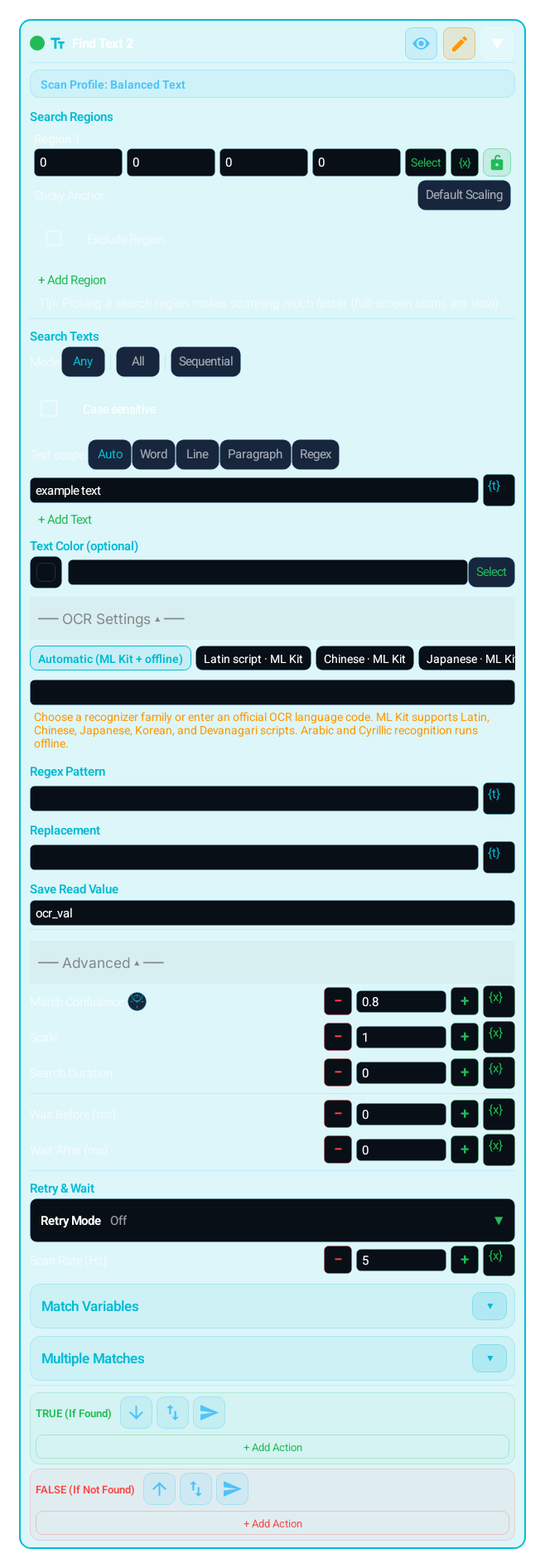
Searches for specific text on screen using OCR (optical character recognition). Reads text from the screen and compares with your input. Multiple texts can be searched ("Any", "All" or "Sequential" mode). Goes to TRUE when found, FALSE when not. Optional regex find / replace fields normalize raw OCR text before the cleaned value is written to the Result Variable (default ocr_val). The OCR recognizers ship with the app; no internet connection is needed.
The OCR regex find/replace surface in TEXT should be used to normalize noisy OCR output before compare, logging, or export steps.
IMAGE, TEXT, COLOR and the other search blocks that use the Search Regions editor can define several search regions with + Add Region; OCR_VALUE tries its read regions in order. Inside a search region, Exclude Region skips noisy areas such as a HUD or a badge, and it applies only to the search region it belongs to. From 1.0.51 one search region can hold several excluded regions, each with its own shape and its own variable or Dialog binding.Coming soonv1.0.51
You can now assign a sticky anchor to each search region. This brings Region.sticky into the no-code surface so the region can stay aligned to anchors such as top_left, bottom_right, or center when screen geometry changes.
Search Duration (ms) defines one search window; 0 means a single look. Retry Mode in the Retry & Wait section is Off, Infinite Loop, Retry On True, Retry On False, Wait Until Found, or Wait Until Gone, so a block becomes a one-shot check, a controlled polling step, or a step that waits for a target to appear or to disappear. Retry Timeout (ms, 0 = unlimited) bounds the loop; Scan Rate (Hz) sets scans per second.
mScore, scale, and scan engine choices matter across themes, display sizes, and rendering differences. Smaller regions plus the right engine dramatically improve builder stability.
Use when you need to check changing text on screen:
Catch status messages like "Success", "Complete", "Error"
Check if specific text is visible
Check price, date, or any text content
Menu items, notification text, alert messages
Unlike IMAGE, it can find text EVEN IF APPEARANCE CHANGES (text-based, not visual)
"Add Block" → "Text (TEXT)"
Enter text to search. Add multiple with + button
SEARCH MODE:
"Any": TRUE if any entered text is found
"All": All texts must be found simultaneously
"Sequential": each text is tried in turn with its own TRUE/FALSE flow
SCAN REGION: Limit to area where text can appear
TEXT COLOR FILTER: Filter by the colour sampled inside the matched text box; "+ Add colour" adds more colours (optional)
SCAN ENGINE: balanced_text is the default; the full list is under Parameters
OCR regex find / replace (optional): Enter pattern and replacement to normalize raw OCR text
Configure TRUE/FALSE branches
If retry is needed, set Scan Rate (Hz) to control attempts per second
Multiple texts can be added with + button
"Any" = one is enough, "All" = all must be found, "Sequential" = each text is tried in turn with its own TRUE/FALSE flow
Finds text whose match box contains a sample close to one of these colours; "+ Add colour" adds more colours
Normalizes raw OCR text with regex. Pattern and replacement fields are optional; the cleaned result is written to the Result Variable (_lastOcrText remains only for older custom code)
Variable that receives the read and cleaned text (default ocr_val)
balanced_text (default), quick_text, precision_text, strict_text (no partial-word hits), tiny_text, low_contrast_text, template_text and the script profiles chinese_text, japanese_text, korean_text, devanagari_text, arabic_text, cyrillic_text
Attempts per second inside the retry window: 1–30 Hz; 0 = fastest
Same parameters as IMAGE (Scale 0.50–4.00)
Writes the 0.0–1.0 confidence to the variable named in Advanced; COMPARE it to drop weak matches (same as IMAGE)
Writes the match box into your own variables such as matchX/Y/W/H; CLICK {matchX},{matchY} to act there (same as IMAGE)
Same as IMAGE: a Condition in each entry's lightbulb; several exclusions per region
| Parameter | Description |
|---|---|
| Search Text(s) | Multiple texts can be added with + button |
| Search Mode | "Any" = one is enough, "All" = all must be found, "Sequential" = each text is tried in turn with its own TRUE/FALSE flow |
| Text Color (optional) | Finds text whose match box contains a sample close to one of these colours; "+ Add colour" adds more colours |
| OCR Regex Find / Replace | Normalizes raw OCR text with regex. Pattern and replacement fields are optional; the cleaned result is written to the Result Variable (_lastOcrText remains only for older custom code) |
| Result Variable | Variable that receives the read and cleaned text (default ocr_val) |
| Scan Engine | balanced_text (default), quick_text, precision_text, strict_text (no partial-word hits), tiny_text, low_contrast_text, template_text and the script profiles chinese_text, japanese_text, korean_text, devanagari_text, arabic_text, cyrillic_text |
| Scan Rate (Hz) | Attempts per second inside the retry window: 1–30 Hz; 0 = fastest |
| Match / Scale / Timeout / Wait | Same parameters as IMAGE (Scale 0.50–4.00) |
| Score Variable (Advanced) | Writes the 0.0–1.0 confidence to the variable named in Advanced; COMPARE it to drop weak matches (same as IMAGE) |
| Match Position (matchX/Y/W/H) (Advanced) | Writes the match box into your own variables such as matchX/Y/W/H; CLICK {matchX},{matchY} to act there (same as IMAGE) |
| Item conditions and multiple exclusionsComing soonv1.0.51 | Same as IMAGE: a Condition in each entry's lightbulb; several exclusions per region |
Scenario 1: Wait until "Success" message appears
TEXT block → enter "Success"
Retry Mode: "Wait Until Found", Retry Timeout: 5000 ms
In TRUE: Proceed to next step
Scenario 2: Check multiple error messages
TEXT block → add "Error", "Connection lost", "Timeout"
Search mode: "Any"
TRUE: Error found, restart app with SYSTEM
FALSE: Everything normal, continue
MOST COMMON COMBINATIONS:
TEXT + CLICK: Click when text is found
TEXT + SYSTEM: Restart app when error message seen
TEXT + LOG: Log found text
TEXT + COMPARE: Decide based on text content
TEXT + SET_VARIABLE: Save text status to variable
TEXT + TRY_CATCH: Usually unnecessary; TEXT does not throw and goes to FALSE when not found
Searches for text on screen (OCR)
WARNING:
The block does not run without input text
OCR may struggle on very small or blurry text — keep region narrow
The block runs in single-engine mode; there is no automatic full-screen fallback
Special characters may occasionally be misread
SCRIPT COVERAGE: Recognizer-family coverage spans Latin, Chinese, Japanese, Korean, Devanagari, Arabic, and Cyrillic. This family list is not an independent per-language accuracy guarantee. Prefer template_text or IMAGE flows for scripts outside those families or for rapidly changing glyph shapes.
The same block at three levels: a quick start, the real options, and professional techniques.
The TEXT block reads the screen with OCR (optical character recognition) and searches for the text you type. It goes TRUE if found, FALSE if not. Unlike IMAGE, it can find the same text even when its appearance (font, colour) changes. Simplest use: type "Success", shrink the scan region to the narrow area where the message appears, and set Retry Mode = Wait Until Found, with the total time in Retry Timeout, to wait until the text shows up.
You can add multiple texts (searchTexts); with Search Mode (textSearchMode) "any" (Any) the block is TRUE when one is found, "all" (All) requires them all at once, and "sequential" (Sequential) tries each text in turn with its own TRUE/FALSE flow. Scan Engine (scanEngine) is chosen per text: balanced_text (Balanced Text) is the default; quick_text is fastest, precision_text is stricter, strict_text matches whole words without partial-word hits; tiny_text is for small, dense text, low_contrast_text for faint text, template_text is template-based for unsupported scripts; chinese_text, japanese_text, korean_text, devanagari_text, arabic_text and cyrillic_text are script profiles. Text Color Filter filters by the colour sampled inside the matched box; "+ Add colour" adds more colours, and any one of them is enough. The OCR SCRIPT SELECTION decision (ocrScript) directly determines accuracy. Options: auto (auto-detect), latin, chinese, japanese, korean, devanagari, arabic, cyrillic — plus cataloged OCR locale-routing codes (en, fr, fr-CA, de, zh-Hant, ja, ko, hi, ar, ru, tr, vi, sw, sa ...). These codes select a recognizer family; they are not an independent per-language accuracy guarantee. Decision guide: for Latin-based languages (TR/EN/DE/FR/ES/VI ...) use latin; chinese for Chinese, japanese for Japanese, korean for Korean, devanagari for Hindi/Marathi/Nepali/Sanskrit, arabic for Arabic/Persian/Urdu, cyrillic for Russian/Ukrainian/Serbian-Cyrillic. The Latin/Chinese/Japanese/Korean/Devanagari recognizers use ML Kit and the Arabic and Cyrillic recognizers use Tesseract; all of them ship with the app and need no internet connection. auto is convenient but can fall to the wrong family on a mixed/noisy screen — if you know the script, choosing it explicitly noticeably improves accuracy. OCR regex Find/Replace (ocrFindPattern + ocrReplacePattern) normalizes raw OCR output; later blocks consume the cleaned value through Result Variable (ocrResultVar, default ocr_val). _lastOcrText remains only as backward compatibility for old CUSTOM_CODE flows.
OCR noise is a real problem; use ocrFindPattern/ocrReplacePattern to make the text reliable. Concrete example: a game currency reads like "1,234 G" but you only want the number — set ocrFindPattern = [^0-9] (everything that is not a digit) and ocrReplacePattern = (empty); the raw output normalizes to "1234" and flows to later blocks through Result Variable (default ocr_val). Likewise you can fix OCR's O↔0, l↔1 confusion with ocrFindPattern = O, ocrReplacePattern = 0. ADVANCED matchTuning applies here too: write the OCR confidence with scoreVar, use COMPARE matchScore >= 0.88 to avoid acting on half-rendered text; capture the text position with contextX/Y/W/H, then CLICK {matchX},{matchY} on the text or MATH_EVAL to a button beside it. Recognizer-family coverage spans Latin, Chinese, Japanese, Korean, Devanagari, Arabic, and Cyrillic (Latin/Chinese/Japanese/Korean/Devanagari via ML Kit, Arabic/Cyrillic via Tesseract; all ship with the app); this list is not an independent per-language accuracy guarantee. For scripts outside those families or rapidly changing glyphs, prefer template_text or IMAGE flows. Timing follows the same contract as IMAGE: searchTimeout = 0 is a single attempt and > 0 rescans within that window; scanRateHz = 0 is the fastest pace with only a 1 ms pause between attempts, while an explicit low Hz is the battery-friendly choice. Keep the region as narrow as possible: a small region both speeds up OCR (full-screen OCR is expensive) and reduces misreads.
Small, reproducible examples that combine several blocks — build them straight into your own macro.
This block is useful on its own — but it shines when paired with the right partners.
Capture the text position with contextX/Y and tap it directly, or a neighbouring button via MATH_EVAL; the position stays live even if the text moves.
When an error message is seen, restart the app with SYSTEM to auto-recover a stuck flow.
Regex Find/Replace writes the cleaned text directly to your selected Result Variable; ocr_val is the default and can be logged, compared, or used in calculations.
Branch on the read text content or the scoreVar confidence; this prevents acting on half-rendered text.
Wrapping TEXT in TRY_CATCH. TEXT does not throw; when not found it simply goes to FALSE, so TRY_CATCH is unnecessary. Fix: use the FALSE branch.
Trying to read very small text in a wide region with balanced_text. Fix: narrow the region and switch to the tiny_text engine; raise Scale if needed.
Comparing raw OCR output directly ("l00" vs "100"). Fix: normalize with ocrFindPattern/ocrReplacePattern before comparing.
Leaving ocrScript = auto when the text is non-Latin and falling to the wrong family on a mixed screen. Fix: if you know the script, choose it explicitly (arabic/cyrillic/chinese ...); accuracy improves noticeably.
For unsupported scripts or rapidly changing glyphs, switch to the template_text engine; it template-matches instead of OCR-ing, making it more stable in those cases.
ocrFindPattern is a regex pattern and ocrReplacePattern is the replacement text: [^0-9] → (empty) keeps digits only, \s+ → single space collapses extra whitespace. The cleaned value lives in the variable selected by ocrResultVar (default ocr_val), sparing you from comparing raw text.
In any mode, add several synonym/translation strings (e.g. "OK", "Tamam"); one block then works across different languages or versions.
Use Text Color Filter (textColor) to catch only a specific colour of the same word (e.g. green confirmation); it filters out the inactive grey version of the same word.
Coming soonv1.0.51Each search text and each extra text colour can get a Condition from its lightbulb (same rules as IMAGE). A colour whose condition is off is skipped, and later active colours are still tried.
The Lua below is what the Code Editor generates for this block with sample settings. Adding cases, branches, actions or loops, or changing settings, extends the generated code accordingly. Study it to see what the block does under the hood, to learn Lua, or to copy and adapt it. Use the Copy button (top-right) to paste it into the Code Editor, or “Try in Editor →” to run it in the live editor.
Snap.screenRefresh()
local reg1 = Region():noScale()
local m1 = nil
if m1 == nil then
 local _textColorTargets = { "#000000" }
 local _textColorTolerance = 17
 local function _textColorAccept2(_textColorCandidate2)
  if _textColorCandidate2 == nil then return false end
  local _textColorPoint2 = _textColorCandidate2:getPoint()
  if _textColorPoint2 == nil then return false end
  local _textColorX2 = _textColorPoint2:getX()
  local _textColorY2 = _textColorPoint2:getY()
  local _textColorW2 = math.max(1, _textColorCandidate2:getW() or 1)
  local _textColorH2 = math.max(1, _textColorCandidate2:getH() or 1)
  local _textColorPoints2 = {
   {_textColorX2, _textColorY2},
   {_textColorX2 - (_textColorW2 * 0.25), _textColorY2}, {_textColorX2 + (_textColorW2 * 0.25), _textColorY2},
   {_textColorX2, _textColorY2 - (_textColorH2 * 0.25)}, {_textColorX2, _textColorY2 + (_textColorH2 * 0.25)},
   {_textColorX2 - (_textColorW2 * 0.25), _textColorY2 - (_textColorH2 * 0.25)},
   {_textColorX2 + (_textColorW2 * 0.25), _textColorY2 - (_textColorH2 * 0.25)},
   {_textColorX2 - (_textColorW2 * 0.25), _textColorY2 + (_textColorH2 * 0.25)},
   {_textColorX2 + (_textColorW2 * 0.25), _textColorY2 + (_textColorH2 * 0.25)}
  }
  local _textColorSamples2 = Color.getAllScreen(_textColorPoints2)
  if type(_textColorSamples2) == "table" then
   for _, _sample in ipairs(_textColorSamples2) do
    if type(_sample) == "string" then
     for _, _textColorTarget in ipairs(_textColorTargets) do
      if type(_textColorTarget) == "string" and Color.isSimilar(_sample, _textColorTarget, _textColorTolerance) then return true end
     end
    end
   end
  end
  return false
 end
 local _textTemplate3 = Asset.text("baslat"):mScore(0.8)
 local _mtEntries4 = {}
 if #_mtEntries4 < 256 then
  local _mtRegionList5 = (function()
   local _scanOk, _scanValue = pcall(function() return reg1:findMulti(_textTemplate3, {engine="balanced_text", ocrScript="latin"}) end)
   if not _scanOk then
    _lastMatch = nil
    error(_scanValue, 0)
   end
   return _scanValue
  end)()
  if _mtRegionList5 ~= nil then
   local _mtRegionCount5 = math.min(#_mtRegionList5, 512)
   for _mtRegionIndex5 = 1, _mtRegionCount5 do
    if #_mtEntries4 >= 256 then break end
    local _mtCandidate5 = _mtRegionList5[_mtRegionIndex5]
    if _mtCandidate5 ~= nil and _textColorAccept2(_mtCandidate5) then
     _mtEntries4[#_mtEntries4 + 1] = { match = _mtCandidate5, region = reg1, regionIndex = 1, template = _textTemplate3, exclude = nil }
    end
   end
  end
 end
 local _cand1_0 = (#_mtEntries4 > 0 and _mtEntries4[1].match) or nil
 if _cand1_0 ~= nil then
  m1 = _cand1_0
 end
end
if m1 == nil then
 local _textColorTargets = { "#000000" }
 local _textColorTolerance = 17
 local function _textColorAccept6(_textColorCandidate6)
  if _textColorCandidate6 == nil then return false end
  local _textColorPoint6 = _textColorCandidate6:getPoint()
  if _textColorPoint6 == nil then return false end
  local _textColorX6 = _textColorPoint6:getX()
  local _textColorY6 = _textColorPoint6:getY()
  local _textColorW6 = math.max(1, _textColorCandidate6:getW() or 1)
  local _textColorH6 = math.max(1, _textColorCandidate6:getH() or 1)
  local _textColorPoints6 = {
   {_textColorX6, _textColorY6},
   {_textColorX6 - (_textColorW6 * 0.25), _textColorY6}, {_textColorX6 + (_textColorW6 * 0.25), _textColorY6},
   {_textColorX6, _textColorY6 - (_textColorH6 * 0.25)}, {_textColorX6, _textColorY6 + (_textColorH6 * 0.25)},
   {_textColorX6 - (_textColorW6 * 0.25), _textColorY6 - (_textColorH6 * 0.25)},
   {_textColorX6 + (_textColorW6 * 0.25), _textColorY6 - (_textColorH6 * 0.25)},
   {_textColorX6 - (_textColorW6 * 0.25), _textColorY6 + (_textColorH6 * 0.25)},
   {_textColorX6 + (_textColorW6 * 0.25), _textColorY6 + (_textColorH6 * 0.25)}
  }
  local _textColorSamples6 = Color.getAllScreen(_textColorPoints6)
  if type(_textColorSamples6) == "table" then
   for _, _sample in ipairs(_textColorSamples6) do
    if type(_sample) == "string" then
     for _, _textColorTarget in ipairs(_textColorTargets) do
      if type(_textColorTarget) == "string" and Color.isSimilar(_sample, _textColorTarget, _textColorTolerance) then return true end
     end
    end
   end
  end
  return false
 end
 local _textTemplate7 = Asset.text("start"):mScore(0.8)
 local _mtEntries8 = {}
 if #_mtEntries8 < 256 then
  local _mtRegionList9 = (function()
   local _scanOk, _scanValue = pcall(function() return reg1:findMulti(_textTemplate7, {engine="balanced_text", ocrScript="latin"}) end)
   if not _scanOk then
    _lastMatch = nil
    error(_scanValue, 0)
   end
   return _scanValue
  end)()
  if _mtRegionList9 ~= nil then
   local _mtRegionCount9 = math.min(#_mtRegionList9, 512)
   for _mtRegionIndex9 = 1, _mtRegionCount9 do
    if #_mtEntries8 >= 256 then break end
    local _mtCandidate9 = _mtRegionList9[_mtRegionIndex9]
    if _mtCandidate9 ~= nil and _textColorAccept6(_mtCandidate9) then
     _mtEntries8[#_mtEntries8 + 1] = { match = _mtCandidate9, region = reg1, regionIndex = 1, template = _textTemplate7, exclude = nil }
    end
   end
  end
 end
 local _cand1_1 = (#_mtEntries8 > 0 and _mtEntries8[1].match) or nil
 if _cand1_1 ~= nil then
  m1 = _cand1_1
 end
end
_lastMatch = m1
Note: generated code can evolve across versions; helper names (e.g. _reg1, m1) and internal optimizations may change. The logic and the called APIs reflect the block’s behavior.
The guidance below is not identical for every block. It summarizes the professional controls that most often repeat in the selected block family.
Keep the search close to the target. Smaller regions are faster and more stable.
Exclude static noise, badges, animations, or reflective areas to reduce false matches.
Timeout and scan rate define whether the block acts as a single check or controlled polling step.
mScore, scale, and engine choice must be tuned together for theme, resolution, and rendering differences.
OCR_VALUE writes the number it reads to its result variable (default ocr_val); TEXT writes the text it passed through its find/replace step to the Save Read Value variable (default ocr_val). In Match Variables, the score variable (0.0–1.0 confidence) and the X/Y/W/H variables carry the match confidence and position into later blocks: branch on the score with COMPARE, and in CLICK bind the coordinates to them with {x} or turn on Click on match. _lastMatch is the last match that Click on match uses; _lastOcrText is kept only for older CUSTOM_CODE scripts.
TOUCH and TOUCH_BREAK cover recipe-style touch flows. Raw pointer choreography such as Touch.down, Touch.move, Touch.up, Touch.dispatch, Touch.reset, Touch.breakAll, and Touch.releaseAfter is not exposed as a first-class builder block.
Touch.downTouch.moveTouch.upTouch.dispatchTouch.resetTouch.breakAllTouch.releaseAfterThe DIALOG block and dialog designer cover a bounded field set in the builder: Info Text, Text Input, Checkbox, Description, Radio Group, Dropdown, Multi Select, Tab Group, Date Time, Number Range, Slider, Image Picker, Color Picker, File Picker, Recorder Picker, Tag, Signature, and Spacer. The buttons are designed too: the Positive button and Negative button tabs set each button’s text, background, and border color, corner radius, and minimum height next to a preview. Freer Setting.builder composition, multi-step wizard flows, and mixed HUD/dialog choreography still do not map 1:1 into the builder.
Coming soonv1.0.51Two more fields: Agent Detect references (agent_detect_editor) lets the user pick a saved reference set or add and edit references, and Save confirms the selection; Navigation setup editor (navigation_editor) edits a saved map, marker and route from the Dialog and returns the setup and route selection without moving the character.
Setting.builderDialogHudTextViewAgentDetectEditorNavigationEditorHTTP_GET, HTTP_POST, and HTTP_PUT cover common fixed-method flows; HTTP_REQUEST covers one bounded request with method, header lines, body, content type, query parameters (GET and DELETE), timeout, and a bounded retry. These blocks never throw; they write the status code (-1 on a network failure). Cookie handling, chained request objects, and lower-level client flows still need the code editor.
Request()Request.setCookieRequest.getCookiesCUSTOM_CODEThe MAP, LIST, JSON_PARSE, REGEX_MATCH, and METRICS blocks cover the everyday cases: map actions, a static list, reading a value from a JSON path, regex match, find, replace, and split, and metrics actions. The rest of the Map, Array, JSON, Regex, and Metrics APIs (for example Array sort, filter, and map) is broader than the builder recipe model and stays on the CUSTOM_CODE and code editor side.
MapArrayJSONRegexMetricsRuntime helpers, raw Request objects, Lua built-ins such as print/pcall/xpcall, and free-form object chaining patterns are represented through CUSTOM_CODE or the code editor.
RuntimeRequestprintpcallxpcallCUSTOM_CODEEach block card now exposes an independent breakpoint toggle. When enabled, the breakpoint preference is stored with the block.
Breakpoints are only emitted into runtime code when Debug Mode is enabled from Visual Builder settings. When Debug Mode is off, breakpoints stay saved but do not pause execution.
Use ASSERT for fail-fast validation, and use breakpoints for step-by-step tracing and controlled pauses in the same flow.
Variables defined with SET_VARIABLE are accessible throughout the macro (global scope). All blocks can read/write the same variable.
However, a variable defined inside a GROUP will be 'nil' (undefined) until the GROUP executes. Blocks outside the GROUP using this variable may produce unexpected results.
FOR_EACH loop variables (item and index) only carry valid values inside the loop body. Outside the loop they are outside local scope and should not be used.
TRY_CATCH error variable is only valid within the catch block. If the try block succeeds, the catch branch is not entered and the error variable remains undefined.
TIP: Before using a variable inside a GROUP, assign a default value with SET_VARIABLE outside the GROUP. This way the variable won't be nil even if the GROUP has not run.
You can embed variable values and calculations into text fields using {{ expression }} syntax. Expressions inside double curly braces are evaluated as Lua code and the result is inserted into the text.
{{ expression }}Skor: {{ score + 1 }} → "Skor: " .. tostring(score + 1){{ name }} kazandı! → tostring(name) .. " kazandı!"X:{{ x }} Y:{{ y }} → "X:" .. tostring(x) .. " Y:" .. tostring(y)Expressions are checked by the sandbox policy. Security-sensitive calls like loadstring, require, debug are automatically blocked.
Keep scan regions as small as possible — improves speed, reduces false matches.
Always add an exit condition when using infinite loops (BREAK, timeout, or conditional exit).
Use network operations and error-prone steps inside TRY_CATCH.
If you need global error handling, use the Error Handler (ERROR_HANDLER) block as a singleton in the project.
Small coordinate offsets (CLICK/SWIPE) improve tap accuracy across different DPI and screen scales.
Customize macros with Dialog block — different parameters each run.
Define repeating steps once with GROUP_CALL, call from many places.
Cross-macro local library
The Local Shared Macro Area moves blocks, variables, dialog fields, gallery assets, and imported media dependencies between macros on the same device. It is device-local, not cloud sync, not Firebase sharing, and not a replacement for public macro sharing.
Professional usage model: put a reusable login flow, common scan region, shared dialog form, variable group, template image, color profile, replay recording, or imported PLAY_SOUND media file into the shared area from one macro, then import it from the relevant + menu in another macro.
VISUAL_BLOCKSVARIABLESDIALOG_FIELDSTEMPLATE_IMAGECOLOR_SWATCHREPLAY_RECORDMEDIA_FILEWhen one item or a multi-selection is active, the shared-area button can copy the selected part from the workspace, group, true/false action branch, dialog, and variables surfaces into the device-local library.
The shared-area entry under the + menu imports the selected item into the surface that opened it. Main workspace, group, action branch, dialog, and variables each receive the compatible item type.
Gallery items include template images, color swatches, replay records, and imported audio/media files. They can move between macros on the same device so repeated templates, colors, recordings, and PLAY_SOUND media assets do not need to be captured again.
The shared area is not a permanent dumping ground. Delete stale shared items from the shared-library panel; imports create a copy in the target macro and do not rewrite the source macro flow.
AI assistant
Tell MH AI what you want in plain language; it proposes the right block sequence and lands it in the workspace after you approve. In the current release it works with cloud providers such as Gemini, Claude, and OpenAI; on-device local models are on the roadmap.