
API Reference
Macro Handler API Guide
All API objects, methods, and global functions available in Macro Handler scripts. Browse categories from the left panel or use the search.
Lua: Prefer ":" for instance method calls (example: region:find(Asset.image("target"), FindParam.timeout(3000)), match:click()).
Language and OCR scope
14 languages are selectable on both the website and the Android app settings. The website and Android app start in English on first open, and users can switch to their preferred language at any time.
70 official OCR language codes are mapped on-device across 7 OCR families: Latin, Chinese, Japanese, Korean, Devanagari, Arabic, and Cyrillic. For scripts outside the official OCR coverage or rapidly changing glyph shapes, prefer template or image flows.
Trigger and Event scope
Macros can start manually from the dashboard, shortcuts, quick settings tile, and widget surfaces; they can also run from daily time, repeating interval, app launch, and allowlisted notification triggers. On the script side, the Event object exposes source, kind, mode, macroId, packageName, appName, title, body, and at fields.
Total APIs
721
Global Functions
28
Global Objects
48
Object Methods
693
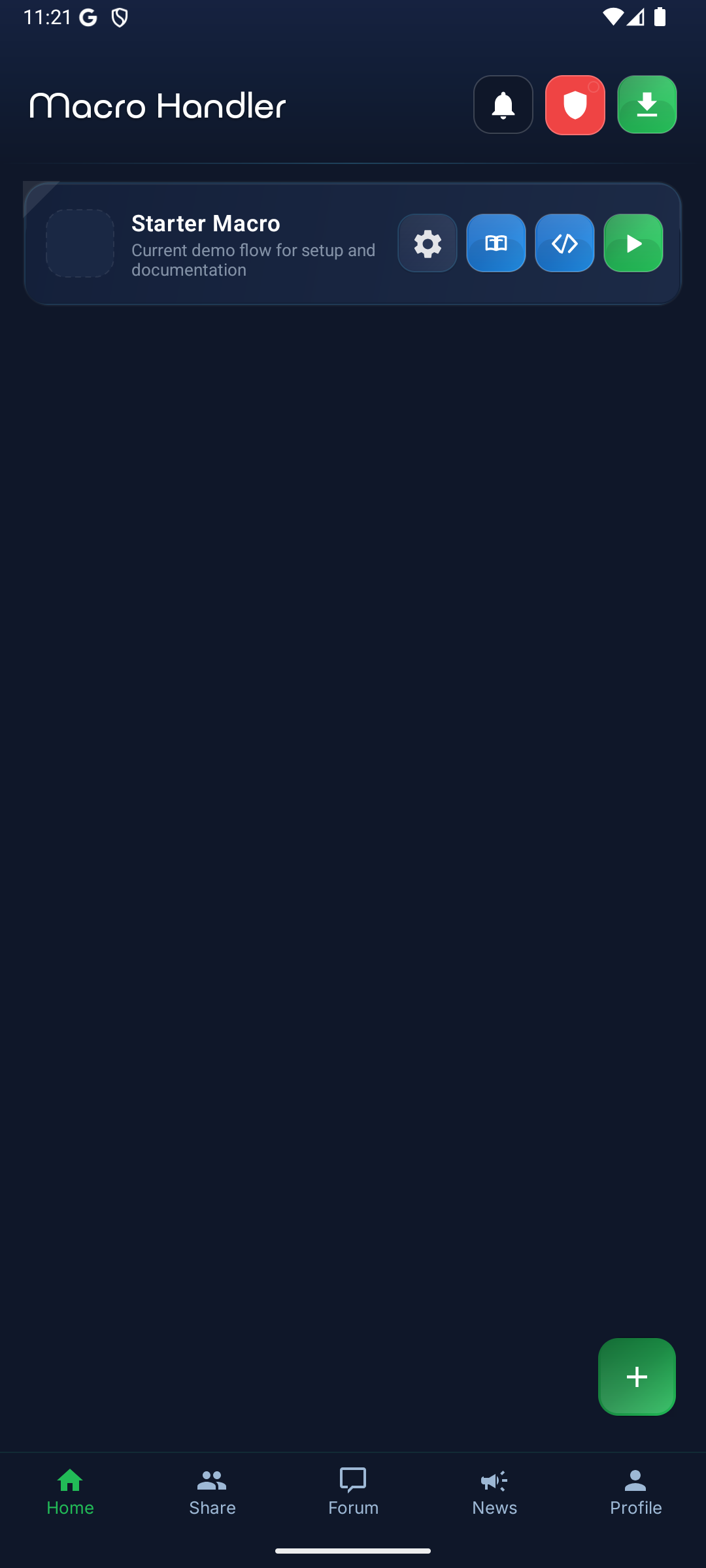
Documentation learning map: macro list
Users first learn saved macros, the new macro flow, and run state from this main screen.
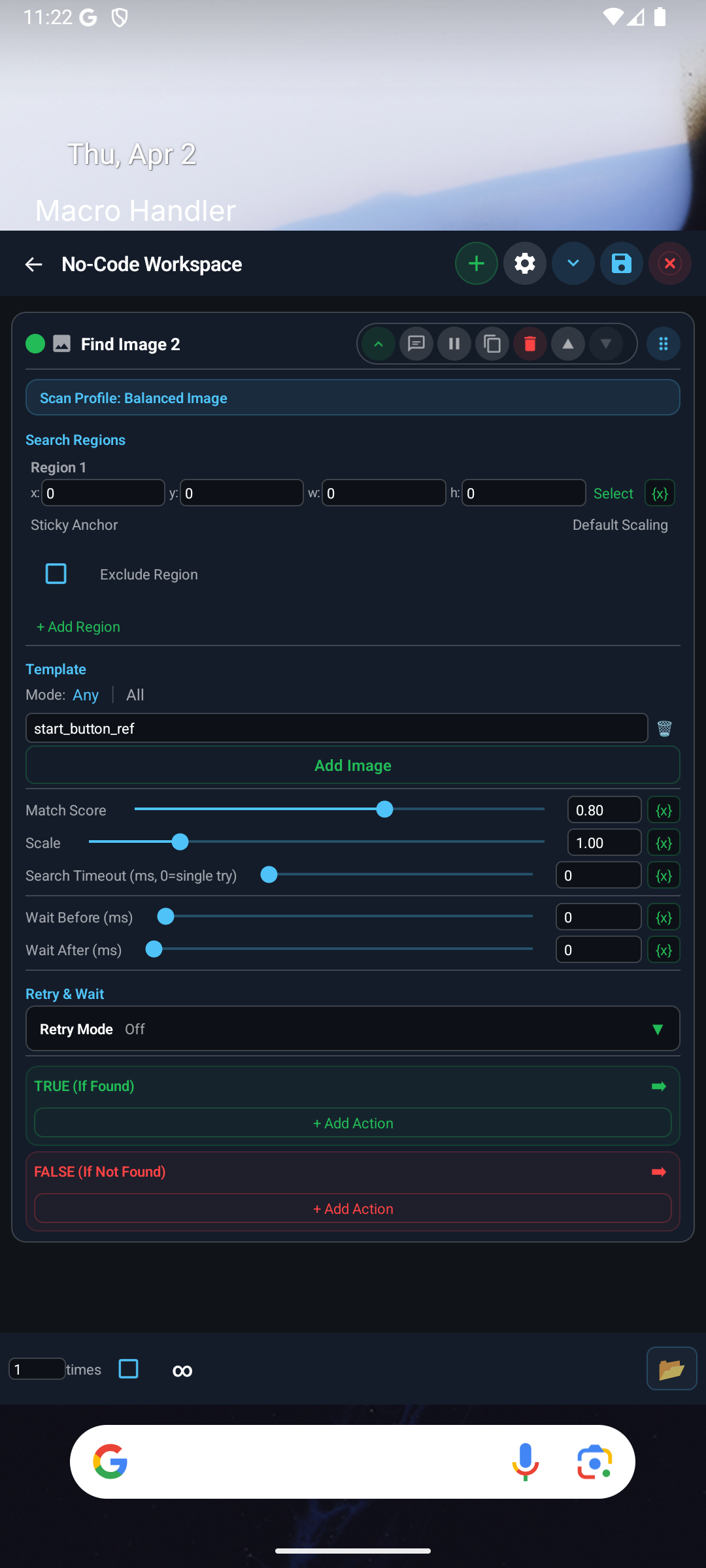
Documentation learning map: no-code workspace
No-code users learn the block card, region/template fields, and step order through a clean real screenshot.
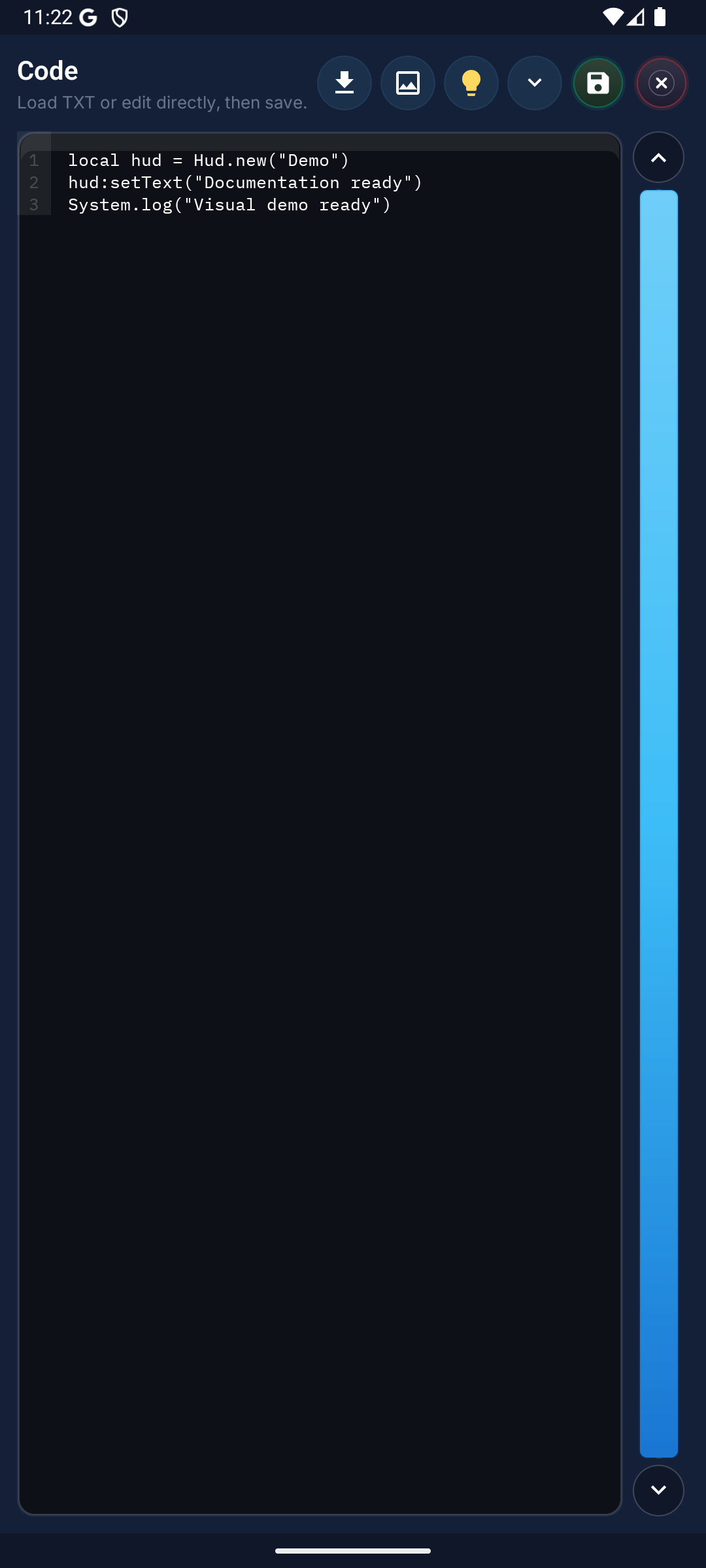
Documentation learning map: Lua editor
Coded users learn by matching API search, sample code, and error output to the editor surface.
Dashboard
No-Code Flow
Lua Editor
Global Functions
Creates an on/off checkbox for dialogs.
Checkbox(true, "Show notifications")Creates a dialog object with title and description for Setting.builder().
Dialog("Settings", "Enter parameters")Creates a text input field for dialogs.
EditText("500", 1, "Delay (ms)")Defines start and end points for a swipe gesture.
local sp = GesturePoint(Point(540, 1500), 0, 300)Creates an image picker component for dialogs.
ImagePicker("target", "Select target image")Creates a builder for constructing multi-swipe gestures.
local msb = MultiGestureBuilder()
-- Add swipe pointsShows in-app runtime messages on screen.
notifyPro("Status", "Step completed")Performs tap action on a target coordinate.
local p = Point(540, 960)
quickTap(p)Creates a single-selection option group for dialogs.
RadioGroup({"Slow", "Fast"}, 0)Requests a graceful stop for the current macro.
if not License.isValid() then
  requestStop()
endExecutes swipe movement between two coordinates.
swipe({GesturePoint(Point(540, 1500), 0, 0), GesturePoint(Point(540, 500), 0, 300)})Defines a tabbed panel layout for dialogs.
TabLayout({"General", "Advanced"})Creates a millisecond delay in script execution flow.
wait(500)
wait(1000)Other
AI is part of the Macro Handler API surface. It is exposed as a singleton global namespace.
Foundation Example
-- AI:ask
local result = AI:ask("value")
-- Use the result in your script flowData and Files
Array is part of the Macro Handler API surface. It is exposed as a singleton global namespace.
Foundation Example
-- Array:sort
local result = Array:sort("value")
-- Use the result in your script flowScanning and Detection
Asset manages screen scanning, image matching, and detection flow. It is exposed as a singleton global namespace.
Foundation Example
local tpl = Asset.image("play_btn")
local reg = Region()
reg:find(tpl)Other
Async is part of the Macro Handler API surface. It is exposed as a singleton global namespace.
Foundation Example
-- Async:promise
local result = Async:promise("value")
-- Use the result in your script flowOther
AsyncPromise is part of the Macro Handler API surface.
Foundation Example
-- AsyncPromise:resolve
local result = AsyncPromise:resolve("value")
-- Use the result in your script flowScanning and Detection
Capture manages screen scanning, image matching, and detection flow. It is exposed as a singleton global namespace.
Foundation Example
-- Capture:stop
local result = Capture:stop()
-- Use the result in your script flowParameter Objects
ClickParam configures detailed search/action parameters. It is exposed as a singleton global namespace.
Foundation Example
-- ClickParam:repeat
local result = ClickParam:repeat("value")
-- Use the result in your script flowData and Files
Clipboard is part of the Macro Handler API surface. It is exposed as a singleton global namespace.
Foundation Example
-- Clipboard:clear
local result = Clipboard:clear()
-- Use the result in your script flowOther
Collection is part of the Macro Handler API surface. It is exposed as a singleton global namespace.
Foundation Example
-- Collection:put
local result = Collection:put("value")
-- Use the result in your script flowScanning and Detection
Color manages screen scanning, image matching, and detection flow. It also behaves as a callable global factory.
Foundation Example
-- Color:pixel
local result = Color:pixel("value")
-- Use the result in your script flowUI and Dialogs
Console is used to build dialogs, settings, or HUD overlays. It is exposed as a singleton global namespace.
Foundation Example
-- Console:out
local result = Console:out("value")
-- Use the result in your script flowOther
Crypto is part of the Macro Handler API surface. It is exposed as a singleton global namespace.
Foundation Example
-- Crypto:md5
local result = Crypto:md5("value")
-- Use the result in your script flowDate and Time
DateTime is used for date, duration, and timing operations. It also behaves as a callable global factory.
Foundation Example
local now = DateTime.now()
toast(DateTime.format(now, "yyyy-MM-dd HH:mm"))Other
Env is part of the Macro Handler API surface. It is exposed as a singleton global namespace.
Foundation Example
-- Env:setMacroCutouts
local result = Env:setMacroCutouts("value")
-- Use the result in your script flowOther
Event is part of the Macro Handler API surface. It is exposed as a singleton global namespace.
Foundation Example
-- Event:exists
local result = Event:exists()
-- Use the result in your script flowOther
Events is part of the Macro Handler API surface. It is exposed as a singleton global namespace.
Foundation Example
-- Events:on
local result = Events:on("value")
-- Use the result in your script flowData and Files
File is part of the Macro Handler API surface. It is exposed as a singleton global namespace.
Foundation Example
File.write("run.log", "Started")
local txt = File.read("run.log")Parameter Objects
FindParam configures detailed search/action parameters. It is exposed as a singleton global namespace.
Foundation Example
-- FindParam:timeout
local result = FindParam:timeout("value")
-- Use the result in your script flowUI and Dialogs
Hud is used to build dialogs, settings, or HUD overlays. It also behaves as a callable global factory.
Foundation Example
local hud = Hud(10, 10, 200, 50, true)
hud:setText("Running")
hud:setTextColor("#FFFFFF")
hud:setBackgroundColor("#80000000")
hud:show()Data and Files
JSON is part of the Macro Handler API surface. It is exposed as a singleton global namespace.
Foundation Example
-- JSON:parse
local result = JSON:parse("sample text", "%d+")
-- Use the result in your script flowData and Files
KV is part of the Macro Handler API surface. It is exposed as a singleton global namespace.
Foundation Example
-- KV:set
local result = KV:set("value")
-- Use the result in your script flowLicense and Security
License is used in license and access validation flows. It is exposed as a singleton global namespace.
Foundation Example
if License.isActive() then
  toast("License active")
endData and Files
Map is part of the Macro Handler API surface. It also behaves as a callable global factory.
Foundation Example
-- Map:get
local result = Map:get()
-- Use the result in your script flowData and Files
Math is part of the Macro Handler API surface. It is exposed as a singleton global namespace.
Foundation Example
-- Math:randomRange
local result = Math:randomRange("value")
-- Use the result in your script flowSystem Control
Metrics provides system/device level helper methods. It is exposed as a singleton global namespace.
Foundation Example
-- Metrics:enable
local result = Metrics:enable("value")
-- Use the result in your script flowTouch and Actions
MultiGesture handles tap, swipe, and action execution flow. It is exposed as a singleton global namespace.
Foundation Example
-- MultiGesture:builder
local result = MultiGesture:builder("value")
-- Use the result in your script flowData and Files
Num is part of the Macro Handler API surface. It is exposed as a singleton global namespace.
Foundation Example
-- Num:parse
local result = Num:parse("sample text", "%d+")
-- Use the result in your script flowTouch and Actions
Panel handles tap, swipe, and action execution flow. It is exposed as a singleton global namespace.
Foundation Example
-- Panel:show
local result = Panel:show()
-- Use the result in your script flowParameter Objects
PlayParam configures detailed search/action parameters. It is exposed as a singleton global namespace.
Foundation Example
-- PlayParam:repeat
local result = PlayParam:repeat("value")
-- Use the result in your script flowTouch and Actions
Point handles tap, swipe, and action execution flow. It also behaves as a callable global factory.
Foundation Example
-- Point:x
local result = Point:x("value")
-- Use the result in your script flowData and Files
Regex is part of the Macro Handler API surface. It is exposed as a singleton global namespace.
Foundation Example
-- Regex:match
local result = Regex:match("value")
-- Use the result in your script flowScanning and Detection
Region manages screen scanning, image matching, and detection flow. It also behaves as a callable global factory.
Foundation Example
local area = Region()
local hit = area:find(Asset.image("ok_btn"))
if hit then quickTap(hit) endTouch and Actions
Replay handles tap, swipe, and action execution flow. It is exposed as a singleton global namespace.
Foundation Example
-- Replay:start
local result = Replay:start({})
-- Use the result in your script flowNetwork and Integration
Request is used for external service communication. It also behaves as a callable global factory.
Foundation Example
local res = Request.get("https://example.com")
toast("HTTP: " .. tostring(res:getResponseCode()))Scanning and Detection
Result manages screen scanning, image matching, and detection flow.
Foundation Example
-- Result:getPoint
local result = Result:getPoint()
-- Use the result in your script flowSystem Control
Runtime provides system/device level helper methods. It is exposed as a singleton global namespace.
Foundation Example
-- Runtime:get
local result = Runtime:get()
-- Use the result in your script flowUI and Dialogs
Setting is used to build dialogs, settings, or HUD overlays. It is exposed as a singleton global namespace.
Foundation Example
local cfg = Setting.builder()
cfg:add("delay", EditText("500", 1, "Delay"))
Setting.setDialog(cfg:build())
Setting.show()UI and Dialogs
SettingBuilder is used to build dialogs, settings, or HUD overlays.
Foundation Example
-- SettingBuilder:setTitle
local result = SettingBuilder:setTitle("value")
-- Use the result in your script flowScanning and Detection
Snap manages screen scanning, image matching, and detection flow. It is exposed as a singleton global namespace.
Foundation Example
Snap.screenRefresh()
local r = Region()
local found = r:find(Asset.image("start_btn"))Other
SSE is part of the Macro Handler API surface. It is exposed as a singleton global namespace.
Foundation Example
-- SSE:read
local result = SSE:read("macro.log")
-- Use the result in your script flowDate and Time
Stopwatch is used for date, duration, and timing operations. It also behaves as a callable global factory.
Foundation Example
-- Stopwatch:start
local result = Stopwatch:start({})
-- Use the result in your script flowData and Files
Str is part of the Macro Handler API surface. It is exposed as a singleton global namespace.
Foundation Example
-- Str:contains
local result = Str:contains("value")
-- Use the result in your script flowParameter Objects
SwipeParam configures detailed search/action parameters. It is exposed as a singleton global namespace.
Foundation Example
-- SwipeParam:repeat
local result = SwipeParam:repeat("value")
-- Use the result in your script flowSystem Control
System provides system/device level helper methods. It is exposed as a singleton global namespace.
Foundation Example
-- System:currentTime
local result = System:currentTime("value")
-- Use the result in your script flowDate and Time
TimeSpan is used for date, duration, and timing operations. It also behaves as a callable global factory.
Foundation Example
-- TimeSpan:fromMs
local result = TimeSpan:fromMs("value")
-- Use the result in your script flowOther
ToastParams is part of the Macro Handler API surface. It also behaves as a callable global factory.
Foundation Example
-- ToastParams:setDuration
local result = ToastParams:setDuration("value")
-- Use the result in your script flowTouch and Actions
Touch handles tap, swipe, and action execution flow. It is exposed as a singleton global namespace.
Foundation Example
Touch.down(Point(500, 1200), 0)
wait(80)
Touch.up(0)Other
Tune is part of the Macro Handler API surface. It is exposed as a singleton global namespace.
Foundation Example
-- Tune:setMinScore
local result = Tune:setMinScore("value")
-- Use the result in your script flowOther
Utils is part of the Macro Handler API surface. It is exposed as a singleton global namespace.
Foundation Example
-- Utils:interpolatePoints
local result = Utils:interpolatePoints("value")
-- Use the result in your script flowSystem Control
Version provides system/device level helper methods. It also behaves as a callable global factory.
Foundation Example
-- Version:code
local result = Version:code("value")
-- Use the result in your script flowOther
WebSocket is part of the Macro Handler API surface. It is exposed as a singleton global namespace.
Foundation Example
-- WebSocket:exchange
local result = WebSocket:exchange("value")
-- Use the result in your script flowDetailed Usage Examples
Ready-to-use examples you can paste directly into the code editor and run. Each example includes detailed descriptions and parameters.